Archive for September, 2009

Las Vegas + Third Tier + Calyptix = Party?

Tuesday, September 29th, 2009

Yes – it’s an equation not to be missed, Amy B has just let me know that there will be the party of parties going on at SMBNation this year hosted by Calyptix and Third Tier – so make sure you check out the details here and don’t forget to say Hi when you get there!

Tags: , ,
Posted in Blog | No Comments »

HP Proliant ML330 G6

Tuesday, September 29th, 2009

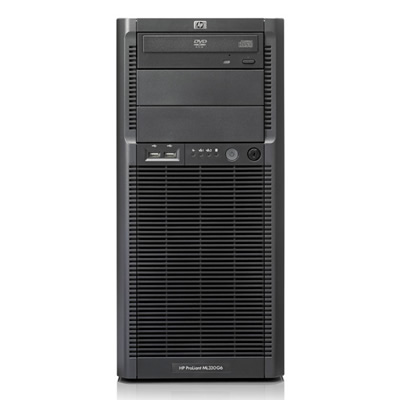
Recently HP released the 6th generation of their product line. As part of that they released the ML330 G6.  This server is focused on the mid level SMB client and includes features that are designed to answer their business requirements.  I’ve been fortunate to have one of these servers for quite a few months now as I was beta testing it for HP.  During the beta I found that the server was 100% stable with no unexpected crashes – something I’ve come to expect from HP.

HPML330G6Front_Lge

The ML330 G6 servers come with a range of CPUs all based on the Nehalem CPUs. The Nehalem CPUs are designed to cater specifically for higher workloads than previous generations CPUs.  They have some impressive performance optimisations around Virtualisation that I tested out myself with various configurations.  I loaded up the ML330 G6 with Windows Server 2008 R2 and the Hyper-V role.  I then installed SBS 2008 as a virtual machine in just over an hour. Wow that’s fast.  Whilst the system I had was in beta, I was certainly impressed with the performance and stability of the server.  OK down to the tech specs.

The ML 330 G6 supports up to 2 physical CPUs and is currently sold in speeds of 2.0Ghz up to 2.53Ghz.  There are factory configurations feature Quad Core CPUs across all models with either single or dual CPU standard which means loads of grunt for the workloads we’re likely to throw at them. What is particularly interesting here is that when you push the CPU hard for some tasks, it is designed to overclock itself a little in order to get that task done faster than before. It does this by shutting down one or two of the other cores of the CPU to ensure that it does not go over the thermal limits of the system.

Memory expansion is not something you’ll need to worry to much about. With up to 18 memory slots, you can take this system up to 144GB of DDR3 Registered RAM if you really need to.  One thing to note is that the Nehalm architecture requires that the memory configurations be balanced across the CPUs.  This means that you need to have equal amounts of RAM dedicated to each CPU.  This is one of the ways that Nehalm achieves it’s massive performance improvements over previous generations of process architecture.  You also need to keep in mind that there are two type of memory you can install into your HP G6 servers, DDR3 Registered and DDR3 Unbuffered. The two types of memory are actually incompatible memory types and you can’t mix the two.  It would seem strange then for HP to offer such configurations until you understand the logic behind it.  You can use the DDR3 Unbuffered RAM for configurations up to 24GB and it’s designed this way as a low cost method for small system configurations.  However if you are designing larger configurations with higher memory requirements then you need to consider using DDR3 Registered from the start to give you better overall growth paths.

In terms of the disk subsystem, the model I had came with an Smart Array 410 controller which is expandable to up to 512MB of Battery Backed Write Cache.  The standard server allows for up to 4 Internal Hot Pluggable or Non Hot Pluggable 3.5” SATA or SAS hard drives. There is an optional expansion chassis that will allow for a further 4 x 3.5” drives of either type if you need it.  This gives this low end system some serious potential in terms of disk capacity. The very entry level model comes with a low end Smart Array B110i controller which I’d recommend upgrading to the 410 with BBWC as soon as possible.  Whilst I’ve not tested this low end controller, I really think you will need the better disk throughput to keep up with the processing grunt this server has to offer.

Externally the server has 3 drive bays of which one is already filled with a DVD ROM as standard (about time too).  It has 8 USB Ports in total 2 on Front, 4 on Rear and 2 internal (1 for tape but I didn’t use this).  The system has 4 x PCI-Express slots internally of various configurations (x8 Gen 1, x16 Gen2 and x8 Gen 2).  The standard power supply is a 460w non hot pluggable/non redundant power supply. You can replace it with a hot pluggable unit and add a second for redundancy. This is another area that needs consideration as you have the option to “right-size” your power supply configuration therefore ensuring optimum efficiency in terms of power management.  Check out their guidance here.  There’s also the option for redundant fans in the system too if needed.

The server runs pretty quietly in my office and it will be a shame to have to give it back to them as I’ve grown somewhat attached to it. Overall I am impressed with the ML330 G6 server. It seems to have a fair degree of expandability without the high cost normally associated with it. My one down side (and this is common across most name brand servers right now) is that I’d like to see them have a couple of ESata ports on the rear for things like external disk backup devices. Given the world is moving this way I can only hope that the G7 series will accommodate this request as a standard feature.

You can find out more about the ML330 G6 here or buy one from my company here if you so desire.

Tags: , , , ,
Posted in Reviews | 2 Comments »

A few glitches on the site

Monday, September 28th, 2009

Over the past few days I’ve had a couple of strange posts appear on the RSS feed and also a couple of FAQcasts that went live before they were supposed to. Sorry about that :-)

I’ve been playing with scheduled posts and the great ability it gives me to be able to write content for release at a later date, unfortunately in my desire to get the content into the site, I actually messed up and didn’t complete some of the posts themselves.  I’ll get them sorted in the net 24 hours or so.

Just an FYI is that from noon Tuesday I’ll be winging my way from Sydney through to Las Vegas for the Fall SMBNation.  I’m so looking forward to catching up with all my stateside friends and am bringing armfuls of Freddo Frogs and Caramello Koalas for anyone attending my Virtualisation in SMB with Dana Epp.

See you all soon!

Tags: , ,
Posted in Blog, News | No Comments »

How this site was built – Part 2

Monday, September 28th, 2009

Following on from my blog post last Monday , you’ll know that I had a clearer idea of what I wanted. Firstly – focus on the Branding. Get the graphical side of things right. I decided that I needed to get moving on the design of the site.  I had already had an association with Sarah East who had done work for me before. She’s a small business just like me. Sarah listened to what I wanted, asked lots of questions and then set about designing not the website, but my business cards and letterhead.  From here Sarah then asked more about the sites I liked and what I wanted in my own site. She came up with the mock-ups for the site and we went back and forth a few times to get it just right. Sarah gave me static JPGs of the Web site that represented what the end site would look like with everything right where it should be.  I was able to then take this to a web designer for the next stage.

Lesson #3 – Getting it right at this stage is far cheaper and easier than later in the process.

For the next stage in the build process, I contacted one of my long time associates Mark Kofahl from Solutions Outsourced.  We’ve recommended Mark and his team to a number of clients we have in our reseller business Correct Solutions.  Mark suggested initially that I could use the Content Management System he has built for his clients.  I’d already decided however that I needed mine to be based on WordPress.  Mark through his network of contacts enlisted the help of Adrian Stein from Blackbird Solutions.  Adrian had specific experience with being able to turn a static graphic image into a real working WordPress template.  He took the graphics that Sarah designed for me and then built the template on his own servers allowing me to see what it looked like for real.  It was then that I realised that I needed a number of changes not only to the design but also to the layout of the site.  Adrian and Sarah both engaged with me to make the needed changes and it was not long before I had a working template that I was happy with.

Lesson #4 – Get the overall site map well thought out before you start the graphic design process.

More in next Monday’s instalment on how this site was built.

Tags: ,
Posted in Blog | No Comments »

Does anyone like Norton Antivirus?

Thursday, September 24th, 2009

Yes – that’s the headline of an article I read today on Secure Computing Magazine.  Like any product, they all go through their highs and lows, but I think it’s an interesting question to ask in such an open forum about ANY Antivirus product.  Typical responses from people will range from the “!#$% no – it’s a piece of %^&*” though to “I love it, it’s saved my marriage, helped cure cancer and world hunger”.  I’ve seen all out brawls in some of the online communities as people talk about Trend vs Symnatec vs NOD vs McAfee – often degenerating into verbal abuse rather than the technical features of the product itself.  This is sad to say the least, but it happens.

Regardless of the AV product you run, each of us have our own knowledge of the in’s and out’s of it and if we have enough experience can also tune it beyond what the typical vendors support team can do.  What’s your favourite AV package and more importantly why?

Tags: ,
Posted in Blog | 2 Comments »

Your account has been speed limited…

Wednesday, September 23rd, 2009

Yes – it’s a message that we here in Australia are all too used to seeing.  Most ISPs here offer their broadband in various speed limited / capped plans to rip us off even more.  I’m with Telstra Bigpond and my billing cycle starts on 10th of the month.  Due to Telstra monopoly over the phone exchanges they are the ONLY ONES that I can use to get DSL2 + here at home.  I’ve tried unsuccessfully but we are on a RIM exchange and ONLY TELSTRA can do this due to their internal policies.

I’ve been ill the last few days with a massive chest/throat infection and today the day that Sydney is gripped by the fiercest dust storm in history, I’m now forced to head out to client sites to do work that I could have done from home… all due to Telstras billing practices.

Oh – yes – I do have an option.. I can increase my plan from the 12GB per month – which BTW is both upload AND download, to 25GB.  Therefore my monthly cost will now be $109 per month…(I have a static IP which they charge and extra $10 for per month.  And once I increase my plan I canNOT decrease it therefore being FORCED to stay on the higher charges.

People wonder if Cloud computing will take off here in Australia, whilst there are predatory billing practices like this from our largest telco and whilst they own the majority of the communications infrastructure then no – it’s a dead duck.  No business person in their right mind is going to move everything to the cloud whilst things like this exist.

Tags: , ,
Posted in Blog | No Comments »

FAQcast 4

Wednesday, September 23rd, 2009

Disaster Recovery – a few years back, Ian and Janine Brown from Tamworth in central New South Wales experienced first hand their own real life disaster as their IT business burned to the ground overnight.  Here they talk about the lessons that they learned at both a business and technical level with the issues they experienced along the way. Hopefully you can learn from their experiences when planning and implementing DR for clients.

Duration: 24 minutes

Tags: ,
Posted in FAQcast | No Comments »

Wireless Notebook Presenter Mouse 8000

Wednesday, September 23rd, 2009

I d a lot of presentations and I often have been using a Logitech Wireless Presenter.  Unfortunately the one I’ve had died.  I needed to find a substitute quickly.  The only real option available was the Microsoft Wireless Notebook Presenter Mouse 8000.  This mouse is a fairly small notebook style device that  is not moulded for either left or right hand and as such for me it’s not one I use every day.  On the underside of the mouse it’s got a number of buttons that allow the presenter to control the presentation whilst walking around the stage. One of the buttons controls the inbuilt laser pointer which is fairly bright at a long distance. Other buttons allow for control of the presentation, media within the presentation and the volume of your laptop.

 MK_po_wnpm8k_detail_1

The mouse comes with a hard plastic carry case to house both the mouse and the Bluetooth dongle which does well given it normally rolls around in my laptop carry bag along with everything else.

Biggest Advantage – compact portable size and the hard carry case

Biggest Disadvantage – not moulded to my hand like the Explorer Mini Mouse – therefore I need to carry two mice with me.

The mouse retails for around $99 AUD and is available through normal channels.

Tags:
Posted in Reviews | No Comments »

FAQcast 3

Tuesday, September 22nd, 2009

Jeff Middleton – known as the master swinger talks about his Swing Migration process. This video interview was recorded in June 2006, but all the key concepts are still very relevant today.  Jeff talks about the overall concepts of the process and the background behind why he decided to document it to the depth he has. You can find out more about Jeff’s process at www.sbsmigration.com

Duration: 17.5 minutes

Tags: , ,
Posted in FAQcast | No Comments »

Explorer Mini Mouse

Tuesday, September 22nd, 2009

I was talking to Shannon Dowden the local Microsoft Geek Gadget Girl about the problems with mice and certain desktop environments. Shannon told me that the Bluetrack mice would solve all my problems. Sure… right, I’ve heard that before :-)   Ok – so Shannon put her money where her mouth was and gave me one to try out.  I took it home and the first thing I tried it on was my frosted glass desk at home.  Most mice simply don’t work in this environment and I’ve needed to use a mouse mat under the mouse which is quite a pain.  Anyway I used the new mouse on the desktop and IT WORKED… it just worked.  I was sold.  The BlueTrack technology is featured in a number of mice in the MS hardware range now and it’s designed to operate on just about any surface at all. From my tests, it works on everything I’ve tried so far which is great.

 mk_emm_otherviews01

What I like specifically about this mouse aside from the fact it works on my glass desktop is the feel of it.  I find that for a mouse to be usable over the long term it needs to fit my hand just right. This mouse does that nicely.  The mouse runs on a single AA battery and right now I’ve used it for a couple of months day in day out without changing the batteries just yet.  It comes with a snap in dongle that powers the mouse off to save battery.  Also it comes with a small carry bag to protect it when it’s in my laptop bag.  All in all a nice package indeed.

It retails for around the $ 99 here in Australia and you can buy them from a variety of commercial outlets.

Here’s the link on the MS website for more information

Biggest Advantage: Comfort factor – this is one mouse I use every day with my laptop

Biggest Disadvantage: The carry case opening is not secure enough to hold the mouse side it in my laptop carry bag. End result is the mouse often slides out  easily.

Thanks Shannon for the mouse – I love it!

Tags:
Posted in Reviews | 1 Comment »