Archive for July, 2010

Why can I not stop my Trend Client Server Security Agent services?

Saturday, July 31st, 2010

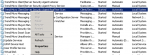
If you have tried to stop some of the Trend Micro Services before and found that the stop option is greyed out like below, you might be concerned that things are not right with your server.  In fact – they are very right indeed.  I normally recommend stopping all Antivirus Services before installing major updates like service packs for Windows or Exchange Server and so on.

image

Trend Micro WFBS has a feature to increase the security on it’s services so that not even an administrator can stop them.  This feature is designed to help prevent malicious programs from terminating Trends ability to protect your system from infection.

In order to disable this feature temporarily, you need to login to the WFBS Security Server console, navigate to the Security Settings for that group – this is my server so it’s in the Servers (Default) group.

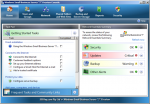
You will see in the screen shot below, the Client Security setting is set to High.  Change this to Normal and select Save.

image

Now – on the Server computer itself, right click on the Trend CSA icon in the taskbar and select Update Now.  Give it a minute to grab the latest configuration from the Trend Security Server and then you will be able to right stop services again.  See below.

image

Make sure that after you have done your maintenance, that you go back into the Trend Security Server Console and change the setting back to High.

Tags:
Posted in FAQs | 3 Comments »

SBSv7 and SBS Aurora Videos online

Friday, July 30th, 2010

With the upcoming beta for SBS v7 and SBS Aurora, Microsoft have released a number of videos that give you more of an idea of what is inside each product.  You can check out the videos below.  Make sure you register for the beta program here to be able to play with the new products before they are released.

Still no name on what they will call SBSv7 – so for now I’m calling it SBS 2008 R2 as it seems to fit in the MS naming range the best.  Microsoft will in due course announce the proper names for both of these new products.


Becky Ochs talks about Aurora


Michael Leworthy talks about Aurora


Get Microsoft Silverlight


Beck Ochs talks about SBS v7


And to give you an idea about who Becky Ochs is check out her biography here.


Once the public beta is out there, I’ll be recording a number of my own videos on these two new products so you can get my real world spin on it :-)

Tags: , , , ,
Posted in Blog | No Comments »

ShadowProtect IT Edition used in Disaster Recovery

Tuesday, July 27th, 2010

Ok – I’ve done a fair bit of work with StorageCraft ShadowProtect over the years – possibly even being one of the first in Australia to test them out.  I use ShadowProtect in many of our customer environments, sometimes as the only backup product, other times in conjunction with other products.  It really depends on the specific scenarios that we have as to what we use and why.

In my personal SBSfaq.com server environment, more recently I’ve been using the inbuilt SBS 2008 backup, but last week switched over to the ShadowProtect 4.0 release. I should clarify – I installed it but didn’t get a chance to configure it as I left it too late before walking out the door on a business trip.  While on the business trip, I forgot that I’d not configured my backups for ShadowProtect 4.0.  Therefore my server was not being backed up.  Again – had I read my daily SBS 2008 reports, I would have known this.  You can’t help some people now can you. :-(

Ok – so Wednesday around 10:30am, my SBS 2008 server stopped responding to me.  No idea why, but given I was heading home that evening, I figured I’ll deal with it then.  I got home that evening to find that my server was non responsive.  Strange I thought, looks like the only solution is a power cycle it.  I power cycled it and then let it reboot.  It didn’t quite come up correctly… well it came up with a logon screen, but refused to accept my password.  I power cycled it again and tried to get into safe mode – no go – “No logon servers available to service your request” was the error message – or similar to that.  Ok – at this point it looked like my server was toast.  I could also hear a strange clicking noise coming from the server – a sign that one of my hard drives had failed.  Not good at all.  My last known good backup was from around a week ago which I’d done using the SBS 2008 backup program.  I knew that there was other data and email that had changed in that time and I was not keen to lose that.

So I took my ShadowProtect IT Edition USB stick and plugged it into the failed server – changed the BIOS to boot from removable devices and attempted to boot from the USB stick.  “Operating System not found” was my boot message – hmm – not good start.  No problems – there’s a tool on the ShadowProtect IT Edition USB stick to create an ISO for just those circumstances.  Took the USB stick to my laptop and created the bootable ISO.  Yup – boots from that but I need to have the USB stick installed so it can located the licensing files it needs – gotta make sure I’ve not stolen this copy of IT Edition.  All cool so far – it’s booted up and now I can see my failed servers hard drives.  Ok – time to commence a backup to an attached USB hard drive.  Cool – all works well and I get the core of my server down to the USB drive – I’ve got a 500GB mirrored set and a 1.5TB mirrored set – for now – I focus on the 500GB drives as this is where my core OS and email are located.  The 1.5TB drives are other things like ISO images etc that is not so critical to me.

I’ve been going to take my SBS 2008 server over to Hyper-V for some time – no time like the present :-) I created a fixed size VHD on Hyper-V while the failed server was being backed up, so it was all ready for me to go now.  I took the USB hard drive and connected it to the Hyper-V Host.  I then used the Disk Management software on Hyper-V to mark the USB Hard drive as offline.  Once it’s offline you can add it to the SBS 2008 Virtual Machine as a hard drive. Of course you can’t boot from the IT Edition USB stick, so I booted the Virtual Machine from the CD Image of the IT Edition. As it’s booting up, it looks for the licensing files – naturally it can’t find them – no issues – StorageCraft have thought of this and provided a Licensing Server tool that you can run on one of your machines in the network.  The only problem with this idea is that given I am recovering my SBS 2008 server, I don’t have a DHCP server on my network.  Therefore I had to reconfigure my Netgear firewall/router to be DHCP so the virtual machine could get an IP and therefore see the licensing server.  Oh don’t forget (its written on the screen) that you need to create a firewall exception on the machine hosting the licensing server for port 20248.  Make sure you remove the firewall exception later of course.  Ok – now we’ve got that all sorted they Hyper-V virtual machine can be rebooted and it now can see the licensing server just fine.  The Restore can commence.

I will say here though that this reconfiguration I’ve had to done on my network just to confirm to StorageCrafts licensing requirements is a real pain in the ass.  It’s not the type of thing I want to have to do during a disaster recovery scenario.  However they’ve been forced to take this path due to people deciding to pirate their wonderful tool.  Shame on you shonky resellers.  Having said that I hope that StorageCraft have a good think about this fact – it’s not easy to reconfigure your network just to recover a single machine at times.

Ok – the restore is completing now.  It took 44mins to restore the C: drive (80GB), and 20mins to restore the E: drive (around 20GB data).  I decided not to restore the data partition at the moment – I wanted to get the server up and running.  I performed a HIR from within the SP IT Edition environment and then shutdown VM.  I disconnected the USB hard drive, and booted back up.  Booted it into Safe Mode first up so I can fix an IP address on the SBS 2008 servers NIC and then rebooted.  Woohoo – I’m back on the air.  Most people would stop there, but you need to re-run the Connect To Internet wizard from the SBS 2008 console.  You need to do this as the SBS 2008 server stamps certain information into the registry based on this wizard.  Now we’re cooking – my email is flowing in again.  Given it was a Saturday, I left it running for a few hours before shutting it down and restoring the F: data drive (this was around 250GB of data).  This took 3.5 hours to restore.  I’ve yet to restore the 1.5TB drive – will leave that for later and restore it to an alternate VHD in a seperate VM and then later move the VHD over to the SBS 2008 server.

Ok – so what’s the lessons here…

1. Restoration time too the better part of a day all up.  In a real business DR scenario this is pretty good – but it could have been reduced dramatically if I’d been using a feature called Head Start Restore from ShadowProtect.  This feature is very cool and keeps a “near ready” image of your working server in your chosen format – ie – I could have had it have a VHD standing by ready to be mounted.

2. Be prepared to reconfigure your network if needed.  I’m not real happy about having to do this just to conform to the licensing requirements.  It’s not something I was expecting, and there’s a few other things that I found on the way that I’ve reported to StorageCraft as bugs/suggested improvements – but during a DR – you need to do the minimum needed to get the systems running.

All in all a great result – woohoo for ShadowProtect IT Edition… but I could have improved my DR had i been running the ShadowProtect SBS Edition BEFORE the disaster occurred.  I’ll blog separately about the reason for the DR which in itself is very worrying due to the funky problem with the hardware (nothing related to ShadowProtect at all).

Tags: , , ,
Posted in Blog | 5 Comments »

Routine Maintenance vs Break-Fix – a personal angle

Thursday, July 22nd, 2010

You know how we all try hard to sell our customers on the Routine Maintenance vs Break-Fix model and how often we have issues with the customers understanding it.  Yup – it’s a pain right.  A pain in the ass.  Customers often can’t see the value in getting things checked up on a regular basis when in fact this could really prevent small problems becoming much larger problems.  They think at times that we are like used car salesmen trying to take their last $ from them without regard for their future.  Maybe this can help you relate to your customers the importance of Routine Maintenance vs the Break-Fix model.

This week I had a personal experience that to me proved that regular maintenance vs the break-fix model is oh so very valuable.  You see – there is a history of cancer in my family – I won’t go into it, but suffice to say that its something not to be ignored.  My fathers parents both suffered from it and whilst it was caught early in them they didn’t lead as full a life as they could have.  Therefore when my Doctor recommended that from the age of 40, I get regular checkups on this particular region, I thought “oh – no – I don’t have the time for that”.  I figured “It can’t happen to me”.  You know – the same things our customers say to us when we are trying to sell them on a routine maintenance business model. 

Personally – I’ve delayed having this check-up for 2 years now because it’s not all that nice a process to go through.  Being both a guy and a small business owner – I really didn’t want to take the couple of days off work to have this done to me.  Having said that a few weeks back I had a health scare of a different kind that resulted in my 11 year old son having to call 000 for me (911 for my US buddies).  That ended up with me in the back of an ambulance with paramedics working on me… I was fine and back home later that same day.  To me though this was a wakeup call.  A wakeup call for me to get my butt into gear and start paying more attention to ME ! So finally, reluctantly I booked the appointment with the Dr to get things moving on that other checkups that I’d delayed for 2 years.

Well this week, I went through the preparations for the test – not nice at all.  Then went to hospital on the day, got into the lovely hospital attire (sorry bout that nurses) and got on with it.  I’m afraid of needles myself, and I normally pass out at the thought of having one… yes – I am serious.  The Anesthesiologist came and chatted to me and I told him of my fears and how it affected me.  Not to worry he said – we can deal with that.  He instructed the nurses, and then we were off.  I remember going into the operating theatre and then talking to my Doctor about his IT problems and how I could help him with them…the next thing I knew, I was waking up in recovery with a nurse offering me ice… wow – the Anesthesiologist had done such a good job, I never even felt or saw the needle.  I had no chance to become apprehensive or stressed by it at all.  Later in recovery my Doctor came round to see me.  Yes they had found something unexpected during the tests, so it was bloody good that I’d gotten them done.  The great news is that he’s 99% certain that what was found is not an issue, but he’s going to do further tests on what they removed.  I’m sure it will be just fine and will go for the follow-up visit with him in a few weeks.


What has this got to do with IT.  Well – an awful lot from different perspectives.

First – those of you that are small business owners – stop and look around you.  Look at the things you’ve put off that maybe you should reprioritise such as your own health, a holiday and so on.  You like me probably tend to think you are indispensible.  WRONG.

Second – if you are trying to sell your customers on the Managed Services, or Routine Maintenance plans – use this analogy from  my experience to help them better understand the value. Help your clients understand the value of routine service by using analogies like this one.  Had I left it and not gotten things checked up, things might have been a whole lot worse.

Third – Be like the Anesthesiologist and REALLY listen to the clients requirements before trying to sell your particular plan to them.  Maybe they need something special that you can help them with outside the scope of your normal offering.

Fourth – don’t be afraid to speak up to other guys about mens health issues.  Guys tend not to talk about this stuff because we are all men… but seriously – do your mates a favour and start talking.  Knowledge is power.


Thanks for reading – I know this is a bit of a diversion from the normal topics from me, but I figure it’s important enough to say in public.

Tags:
Posted in Blog | 4 Comments »

SBSv7 and SBS Aurora User Consoles

Thursday, July 22nd, 2010

One of the cool things behind the new SBS Aurora is the new look console that is extensible in so many ways.  Here’s a few screenshots to give you an idea of what is coming.

SBSv7

You can see this looks pretty much like the current SBS 2008 console which is a fair call given it’s basically a product refresh under the covers.  It has the same extensibility as the SBS 2008 console as well.  You can add alerts and custom options in the Security section of the console and thats about it.

image


SBS Aurora

This console looks new – brighter, and more user friendly and that is because it’s not aimed at us IT Professionals – it’s aimed fairly and squarely at the end user.  Microsoft are thinking that the end user will be one of the key people driving this type of console and therefore they want to make it as easy as possible for them to drive.  They also want to make it easy for ISVs, OEM and Software Vendors to add functionality to the console and have made it far more extensible than the SBS 2008 / SBSv7 console is today.

image


WHS – Vail

And for the sake of completeness, you can see the upcoming Windows Home Server codename Vail console.  It looks like the Aurora console and in fact both products are built off the same code base.  Therefore the functionality that exists between them is consistent by and large.

image


NOTE: ALL SCREENSHOTS ARE OF BETA PRODUCT AND MAY CHANGE BEFORE THE PRODUCT IS RELEASED TO MANUFACTURING

Tags: , , ,
Posted in Blog | 3 Comments »

SBSv7 and SBS Aurora Beta – sign up now

Thursday, July 22nd, 2010

image Are you signed up for the beta of these two new Small Business Server products?  If you want to understand where Microsoft are going with servers in the SMB space then you really need to get on board with this.  Sign up for the beta here now.

Tags: , , ,
Posted in Blog | No Comments »

SBSv7 vs SBS Aurora – What’s the difference?

Tuesday, July 13th, 2010

Microsoft yesterday announced future versions of SBS which included both cloud and non cloud based versions.  What is the key differences between the two?  I’ve assembled this information based on what is on the Microsoft.com website announcements so far.

The names for SBS in this article are for reference only – MS have not yet named the final products.

Function SBS Aurora SBSv7
Maximum Users 25 Users 75 Users
Mail System BPOS Integrated Inhouse Exchange 2010
Server Backup Yes Yes
Client Backup Yes Yes
Remote Access Yes Yes


The new versions look pretty darn exciting as they merge in the needs of the clients we have now in the SMB space as well as the needs to update the core product.  SBSv7 and SBS Aurora look great and I’m looking forward to being able to publicly discuss and demo these products in the upcoming weeks.

How can you get involved???  Easy – sign up for the public beta here ASAP.

Tags: , , , ,
Posted in Blog | 1 Comment »

SBS 2008 R2 – Next Versions announced…

Tuesday, July 13th, 2010

No news on the naming of the product yet, but today Microsoft announced details of the next versions of Small Business Server.  The big surprise… there’s TWO versions of the product, not one.  Details here  Both versions will have public beta available by the end of Summer (US time) – go here for the beta.  The two versions of the product however differ greatly from what many think.

Windows Small Business Server Code Name “Aurora” is the big secret here – it combines on premise functionality with cloud computing which many people have asked for.  It supports up to 25 users.  There will be BPOS integration via the console to make it dead easy for you to add users locally and in the cloud.

Windows Small Business Server 7 – is the more traditional onsite solution that is effectively an update of SBS 2008 and allows them to grow to up to 75 users.  It will contain Windows Server 2008 R2, Exchange Server 2010 SP1, SharePoint 2010 Foundation, Windows Server Update Services 3.0 and in the Premium version SQL Server 2008 R2

Exact naming of the products and pricing has not been announced at this point, so stay tuned for more details as they come to hand.  In the meantime – sign up for the beta so you can get your hands on the product quick smart.

Tags: ,
Posted in Blog | 2 Comments »

Trend Micro WFBS 6.0 Visual Guide now available

Monday, July 12th, 2010

WFBS 6.0_front cover Today, I’m pleased to announce the release of my Trend Micro WFBS 6.0 Visual Guide.

This visual guide for Trend Micro Worry-Free Business Security 6.0 will get you up and running in less than an hour while incorporating leading best practices to secure your network environment from malware. This guide is packed with time saving solutions, troubleshooting tips and workarounds for SBS 2003, SBS 2008, Windows Server 2008 and 2008 R2.

This book is available as a PDF version.

You can purchase the book from the online store – here

As an introductory offer, if you use the discount code of LAUNCH2010, you will get a discount of 10% off the normal price of the book but only if you purchase before midnight on July 18th… that’s 1 week from now.

Subscribers to our newsletter and past recipients of the Trend CSM 3.6 Guide will have already received and additional discount over and above the 10% mentioned above.  See – I told you it would be worthwhile being a newsletter subscriber :-)

Tags: , ,
Posted in Blog, News | 10 Comments »

Apple Humour – does it scale?

Friday, July 9th, 2010

clip_image001I received this via email – so I can’t easily credit the source, but I thought it was quite funny and in reality it shows how things tend to work in the industry.  People get into the idea that if they do something once at a given size that they can just scale up from there and the world will beat a path to their door.  Classicly Apple seem to be on the right path with the iPhone and then the iPad (even though I don’t agree here).  Microsoft on the other hand make me wonder at times.  With the drive to move everything to the cloud, we are loosing sense of the scale and technology involved, and I’m not sure that’s a good thing.  We will come to expect things are so easy when in fact they are complicated.  I wonder if we will therefore become complacent with how they deal with technology.


Food for thought over the weekend :-)


Tags: , , ,
Posted in Blog | 2 Comments »