Monday, January 31st, 2011
Trend this last week silently released another patch for WFBS 7.0 to combat issues people are seeing in the real world. The patch is cumulative of the previous public released hotfixes and supersedes the 1370 patch (Trend WFBS 7.0 – Patch 1370 Now Available) released in December.
I found out about the patch via the WFBS Security Console. This is a new feature in WFBS 7 that alerts you when there’s a new significant patch available.
What’s fixed with it?
The fix list includes the following known issues;
There is also at least one undocumented new feature in this release. The screenshot below from my server shows build 1370 – but you will notice the additional lines showing the hotfixes installed on this server – woohoo! I’ve bee asking for that for years now and finally it’s good to see it there.
Where can you get it?
You can get the patch from here on the Product Patch Tab.
Personal Experience
Installation for me on my production SBS 2008 server went without a hitch. It only took a few minutes and it pushed out to the client security agents automatically. I was not currently seeing any of the issues others have seen on this server, but I applied it anyway to check out what might happen. If you are installing new sites, I’d recommend applying this patch ASAP as preventative measures. Below you can see my servers status after the upgrade. Note the Hot Fix History section which lists all applied hotfixes to the server.
What about WFBS 7 SP1?
Trend are working on this now with a public beta available shortly. It will be much more than a collection of hotfixes – it will contain official support for SBS 2011 Standard Edition. Yes – that’s right – WFBS 7.0 as per the documentation DOES NOT SUPPORT SBS 2011 Standard Edition. It only supported the pre-release version. If you assumed it would support the release version of SBS 2011 Standard – you are wrong – bad move
WFBS 7 SP1 will be out soon.
Tags: Antivirus, Patches, TrendMicro
Posted in Blog | No Comments »
Thursday, January 27th, 2011
If you use ShadowProtect or any other backup program to restore your SBS 2008 server to alternate hardware, OR if you have it virtualised and you move it from one virtualisation host to another, then there are a few things you simply MUST do to ensure things work correctly with SBS 2008.
First thing is that upon the first boot, you must use F8 to get into Safe mode. From here disable ANY antivirus software you have running on the system. Some AV software can interfere with the networking stack
Second thing to do is to reboot into Directory Services Restore mode. Here you will fix a static IP the same as the original onto the NIC of the server. Set the Default Gateway and DNS settings as well.
Now reboot into normal mode. Things will come up but you will not have AV protection.
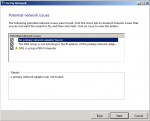
Wait till the SBS console comes up then run the Fix My Network Wizard – it’s on the Network tab and the Connectivity sub tab.
You will likely see the first two items as per below. Allow it to fix those – this may look like it’s paused for a few minutes, but it has not.
Once the wizard has completed you should see the first two items come back to green ticks. Good work.
But wait – you’re not done yet.
The AV services you disabled – re-enable them and do one more reboot to confirm all is good and you are then clean and clear to move on.
Tags: Backup, Disaster Recovery, Microsoft, Restore, SBS 2008, StorageCraft
Posted in Blog | 3 Comments »
Thursday, January 27th, 2011
Many in the IT field love to be called professionals. They take pride in the fact that being called a professional puts them “above the rest”. But really – can you claim to be a professional just because of some badge or achievement or exam you’ve passed?
I talk to many professionals in the SMB space, and one of the things I constantly hear is that they never have time to test out software before deploying it to a clients site. When they have problems, they then blame the software vendor for the issue and not accept the fact that they might have eliminated many of the issues had they taken the time to do some testing first. I don’t for a minute think that doing testing in your own environment will eliminate ALL the things you are likely to see onsite, because things are often different, but taking the time to play with things first means you can more easily become a real professional.
I also hear that people don’t have time to do this because they need to be earning money. Isn’t this part of the rate you charge the customer? Isn’t this part of being a professional that the customer expects that you do know what you are doing?
I also know that you can’t possibly test out every piece of software before you deploy it to the clients – in that circumstance, I advocate being upfront with the client and let them know that you can’t test this before deployment and I’d expect some consideration given in terms of billing for the client whilst you learn on the fly. It seems only right doesn’t it?
Doctors never perform an operation on a live patient – therefore why should we “professionals” go out and do things to our customers network environment if we’ve not even tried it out on our own environment first?
Are you a professional… really?
Tags: Business Focus, SMBiTPro
Posted in Blog | 5 Comments »
Wednesday, January 26th, 2011
My largest site has 28 DCs spread across Australia and New Zealand. Some of them are in very remote location as they are a mining company. I was working on some Exchange 2010 migration with them when I happened to see this error in the event logs of one of my servers. I further checked and found it in the event logs of ALL of my DCs… This put me into a spin initially as it gave me the impression that each of the DCs had stopped replicating with each other. It was not til I re-read it AND run the commands suggested that I realised it was in fact just ONE DC that was not replicating. Coincidentally, one of the very remote sites was affected by the flood. The site itself is fine, but the comms link to the site was severed in the recent floods in Queensland and Northern New South Wales. Ok – so the pressures off right? Nope. As at 25/1 this error was happening for 15 days. The default tombstone life in AD is 60 days. That means we have 45 days to get the link to the site back up and running or else that remote DC will need to be totally rebuilt. Bad news is that the telco – Telstra have advise that they might not make it in that timeframe. So plan B is to send a Tech to site, pickup the server and take it 4 hours drive away to the nearest site that does have comms. We’ll reconfigure it’s IP for that site, and allow it to sync up again for 24 hours before then taking it back to the original site. Not ideal but it will work. Hopefully by blogging bout this experience will save someone else the panic attack that I had.
Log Name: Directory Service
Source: Microsoft-Windows-ActiveDirectory_DomainService
Date: 25/01/2011 6:06:37 AM
Event ID: 1864
Task Category: Replication
Level: Error
Keywords: Classic
User: ANONYMOUS LOGON
Computer: server.domain.local
Description:
This is the replication status for the following directory partition on this directory server.
Directory partition:
DC=domain,DC=local
This directory server has not recently received replication information from a number of directory servers. The count of directory servers is shown, divided into the following intervals.
More than 24 hours:
1
More than a week:
1
More than one month:
0
More than two months:
0
More than a tombstone lifetime:
0
Tombstone lifetime (days):
60
Directory servers that do not replicate in a timely manner may encounter errors. They may miss password changes and be unable to authenticate. A DC that has not replicated in a tombstone lifetime may have missed the deletion of some objects, and may be automatically blocked from future replication until it is reconciled.
To identify the directory servers by name, use the dcdiag.exe tool.
You can also use the support tool repadmin.exe to display the replication latencies of the directory servers. The command is "repadmin /showvector /latency <partition-dn>".
Tags: Active Directory, Replication, Troubleshooting
Posted in Blog | 4 Comments »
Monday, January 24th, 2011
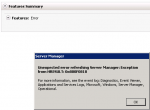
I was building a couple of virtual Windows Server 2008 R2 servers for a client for an Exchange 2010 deployment project last week. I noticed this morning that one of them would not allow me to add roles or features to it which was rather strange. I got the error below when I investigated – 0×800F0818.
I found this Blog post which helped me resolve the issue.
Tags: Microsoft, Patch Management, Patches
Posted in Blog | 1 Comment »
Monday, January 24th, 2011
Trend Micro APAC are seriously looking for feedback from the reseller community on WFBS 7.0 and how well it’s gone for us with our clients….. or not… I know many out there have had issues with WFBS 7.0 that have caused them to look elsewhere. Personally I’ve not seen ALL the issues that others have, but I will agree that there have been things crop up that I did not expect
For those of you that have already moved to alternate product, please take a moment to let them know why you did this.
You can do the survey here – be honest – brutally honest because it’s only with feedback can they do anything to improve the product.
Tags: Feedback, TrendMicro
Posted in Blog | No Comments »
Friday, January 21st, 2011
I moved into a new home a few months back, and when I went to get power and gas connected, I called AGL first. I called them because the power companies queue was too long and so I figured I’d get the gas connected first. While talking to the very helpful AGL customer service rep, she asked me if I had organised the power yet – No – I had not – so she said “We can do that and give you a discount too”. I figured power was much of a muchness and thought – sure – why not – hook me up. I figured I’d get one bill from one company and it would all be great. I knew AGL didn’t do electricity themselves and knew it was coming from a third party company. It came time to move into the house and I found that power and gas were connected on the day in question – cool – very happy with that. That was 2 months ago. This morning I got a call from my alarm company – the power was off at home. Ok – I was in the area so I figured I’d drop by in an hour to check out what was up. When I got home, I found that power was off to my home only and none of the others in the complex… strange I thought.
I called the faults line for the electricity company and they told me that they had no record of power being connected to my address
The helpful lady asked for more of my story, which I told her. She said she had a suspicion as to what was up and asked me to go to the meter box and get the meter number. Gave that to her and she said – oh that’s not your address… that’s such n such address – I said No… I’m standing right here – I am pretty sure I know where I am. She told me she could not help me further though and I had to go to the upstream biller – AGL to get things sorted. Grrrrr.
Called AGL – explain to them and they tell me that my address is wrong… Funny I say to them – I’m right here and the mail gets delivered right here, so HOW CAN IT BE WRONG! I relay the info to them that Integral Energy had told me and they go away for 5 minutes while I’m on hold. They come back and tell me that they “might” be able to get my power back on. They tell me that my address is wrong. GRRR – you can google my address and it shows me here… how can that be wrong? Anyway.. nothing more I can do so I head into the office. Oh they also tell me if it does not come on today, then it will not be on till Monday. No – nothing they can do about it because it’s Integrals fault. Hey – I’m the customer here – I don’t care that YOU messed up, it’s me that’s paying for it. I spoke to a supervisor and he told me that no – there’s no need for compensation, it was a simple mistake on their part, but hey… get over it. Well not exactly those words, but that’s the feeling I left with. He gave me the email address for complaints though which I intend to use.
I arrived home tonight not knowing if I will have power or not. Luckily – I do.
So if you decide to get your electricity through AGL or any other upstream provider, triple check things. I’ll be calling Integral next week to verify my address etc is correct in case I ever need to report a fault in future.
Tags: Personal, Rants
Posted in Blog | 1 Comment »
Friday, January 21st, 2011
Trend Micro APAC are seriously looking for feedback from the reseller community on WFBS 7.0 and how well it’s gone for us with our clients….. or not… I know many out there have had issues with WFBS 7.0 that have caused them to look elsewhere. Personally I’ve not seen ALL the issues that others have, but I will agree that there have been things crop up that I did not expect
For those of you that have already moved to alternate product, please take a moment to let them know why you did this.
You can do the survey here – be honest – brutally honest because it’s only with feedback can they do anything to improve the product.
UPDATE: 24/1 – The original link I was given for this survey was a given to me prematurely – the link above now works
Tags: Feedback, TrendMicro
Posted in Blog | No Comments »
Thursday, January 20th, 2011
The minimum recommended RAM for SBS 2011 Standard is 8GB. There is however some variance to allow for the fact that some servers use RAM for their video memory and other things. Below however you will see that there is a hard block on the installation process that means it will not install with less than 4GB of RAM. Now honestly – you don’t want to run SBS 2011 Standard on less than 8GB as it may struggle depending on load.
Tags: SBS 2011, SBS 2011 Standard
Posted in FAQs | 4 Comments »
Tuesday, January 18th, 2011
Microsoft have released a number of “Learning Bite” videos to walk you through SBS 2011 Standard edition from the Administrative Console down to individual tasks you may wish to perform. These videos are available for free and will walk you through the basics of SBS 2011 Standard edition
Here’s a complete list of what they have at the moment.
SBS 2011 Standard Learning Bites – Administrative Console: http://www.microsoft.com/showcase/en/us/details/620ed52e-2bdb-4515-909f-97681d2d8597
SBS 2011 Standard Learning Bites – Managing Users: http://www.microsoft.com/showcase/en/us/details/514da254-f3b7-4ca1-92e4-7eb05ef1d835
SBS 2011 Standard Learning Bites – Groups and User Roles: http://www.microsoft.com/showcase/en/us/details/8991999e-fc80-490f-898a-82672a0dde6b
SBS 2011 Standard Learning Bites – Connect Computer: http://www.microsoft.com/showcase/en/us/details/fb9ed24b-0f5e-40c5-8683-5fc2773025ab
SBS 2011 Standard Learning Bites – Computer Properties: http://www.microsoft.com/showcase/en/us/details/4df451ee-4098-4305-8dff-4603e1ed015b
SBS 2011 Standard Learning Bites – Health Reporting: http://www.microsoft.com/showcase/en/us/details/62e5dc60-4b5d-4bc3-b29f-36d218f16f18
SBS 2011 Standard Learning Bites – Security: http://www.microsoft.com/showcase/en/us/details/b2662ba3-452f-4b44-a5f0-8aa82f42151d
SBS 2011 Standard Learning Bites – CTIW: http://www.microsoft.com/showcase/en/us/details/1218c6b0-5db2-4d37-99c1-a2688656c7a7
SBS 2011 Standard Learning Bites – Internet Address Management Wizard: http://www.microsoft.com/showcase/en/us/details/0f192dc2-e21f-45b3-baa3-c1e4b189d4bf
SBS 2011 Standard Learning Bites – Backup Wizard: http://www.microsoft.com/showcase/en/us/details/930ab826-457a-4596-a939-877178e2f4de
SBS 2011 Standard Learning Bites – Managing RWA: http://www.microsoft.com/showcase/en/us/details/32195fbe-3018-4897-a278-9dd3f0335129
SBS 2011 Standard Learning Bites – Using RWA: http://www.microsoft.com/showcase/en/us/details/1ba60a50-1329-44df-8062-9455f3a5b1ea
SBS 2011 Standard Learning Bites – Shared Folders: http://www.microsoft.com/showcase/en/us/details/c1ec82e2-c2e9-4164-8c61-e71bcf01df54
SBS 2011 Standard Learning Bites – Managing Storage: http://www.microsoft.com/showcase/en/us/details/59aa838a-af12-450f-9057-b5676d97663f
SBS 2011 Standard Learning Bites – Managing Updates: http://www.microsoft.com/showcase/en/us/details/48c08415-e081-4f03-9945-675b08c637a3
Tags: Learning Bites, SBS 2011, SBS 2011 Standard, Training
Posted in Blog | 1 Comment »