Archive for November, 2011

What colour are the HP LTO Tape Cartridges?

Monday, November 28th, 2011

Recently I had some confusion with a client over what tape should be inserted into which tape drive and their capacity.  The colour of the tape however is what was easily determined and helped resolve the issue quickly.  I figured I’d post this for others in case they need it.  This table is accurate for HP LTO tapes – but other vendors use different colours.

LTO Size Colour
1 100GB / 200GB Blue
2 200GB / 400GB Dark Red
3 400GB / 800GB Yellow
4 800GB / 1600GB Green
5 1600GB / 3200GB Light Blue
Cleaning Cartridge NA Orange

Wikipedia has a table which has other manufacturers LTO tape cartridges and their colours here

Tags: , , ,
Posted in FAQs | No Comments »

How to synchronise the DSRM password with your SBS 2008 Network administrators password

Thursday, November 24th, 2011

One of the things you should do before migration is to ensure that you set your DSRM password to something that you know.  The quickest way to do this is to use NTDSUtil to synchronise it with the current SBS 2008 or SBS 2011 Network Administrators password.

To do this is easy – use the following procedure.

  1. Open up a CMD prompt window
  2. Run NTDSUTIL.EXE
  3. Type SET DSRM PASSWORD and hit enter
  4. Type SYNC FROM DOMAIN ACCOUNT ADMINISTRATOR_ACCOUNT_NAME and hit Enter (where ADMINISTRATOR_ACCOUNT_NAME is your network admin account)
  5. This will set the password to your current network administrators account password.
  6. Hit Q twice to exit the NTDSUTIL tool

You can see below where I’ve configured my SBS 2008 server to sync with the account SBSADMIN


image


Of course, the next thing before you need to use it in a DR scenario is to test it of course!

Tags: , , , , ,
Posted in FAQs | 2 Comments »

How can I stop WSUS 3.0 from downloading updates?
Friday, November 18th, 2011

Working on site this week with a client who has a 512kb link back to their headoffice.  I deployed a new server which had WSUS configured to replicate content and approvals from a central server in headoffice.  The problem was however that it tried to download 23GB of updates from the server during working hours and the bandwidth to headoffice became very limited.  Now I know WSUS is supposed to use background bandwidth, but it just didn’t seem to work.

I needed to find a way to stop WSUS downloading updates from the other server without permanently crippling the server.  The answer ended up being very simple.

  1. In the WSUS 3.0 console, expand the tree and find the Options node. 
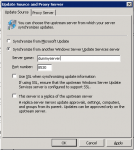
  2. Select the Update Source and Proxy Server option and enter in a dummy server name and port number as you can see below.  Once this is done, restart the WSUS Administration website in the IIS Management console and the downloads will stop.

image

Later you can easily revert this change and continue the downloads without any issue.

Tags: ,
Posted in FAQs | No Comments »

SBS 2008 Monitoring Database grows too big

Monday, November 7th, 2011

Yes – I had this happen on my SBS 2008 server myself.  Instead of taking the normal route to try and resolve it however, I decided to mess with a few SQL commands and try to dig under the covers to see if I could delete data that was too old.  I thought that this might allow me to reduce the content of the database so that I could not go through the hassle of replacing it.  Sadly my SQL skills are not that good and I ended up making the database log files all that much more bigger to the point that I nearly ran out of disk space. 

image

Oh well – I tried it on my system and not a customers system.

End result however is that if your SBS 2008 Monitoring Database grows beyond the 4GB limit, you’ve got no real choice but to replace it with an empty one.  Best place to get one is from a new customer server – or if you don’t have one of those, then you can download a fresh one from here (Thanks Lyle for the link).

Once you have your empty database, the procedure is quite simple.

  1. Stop any backups that you have running – ie the SBS 2008 backup or ShadowProtect.
  2. Open the Services MMC from the Administrative Tools program group
  3. Stop the Windows SBS Manager service and the SQL Server (SBSMONITORING) service.
  4. Rename or in my case delete the SBSMonitoring.mdf and the SBSMonitoring_log.ldf files from the C:\Program Files (x86)\Microsoft SQL Server\MSSQL.1\MSSQL\Data folder
  5. Copy the replacement LDF and MDF files into the same location
  6. Start the SQL Server (SBSMONITORING) service
  7. Start the Windows SBS Manager service
  8. Given that you’ve replaced the database with an empty one, you will need to use the SBS 2008 Console and reconfigure your reporting and alerts.
  9. Also do not forget to re-enable your backups once more and do a backup of your server with the new database in place.

To configure SBS 2008 Alert Notifications do the following;

  1. Open the Windows SBS Console
  2. Select the Network tab
  3. Select the View notification settings task from the task pane on the right hand side
  4. Select the Email Address tab and enter in your email address for notifications
  5. Select OK to close and save the settings

To configure SBS 2008 Reports do the following;

  1. Open the Windows SBS Console
  2. Select the Reports tab
  3. Select the Add a new report task from the task pane on the right hand side
  4. Configure the report to contain the information you need and select OK

Tags: , ,
Posted in Blog | No Comments »

SBS 2011 Essentials and Office 365 Integration

Thursday, November 3rd, 2011

Microsoft this week launched the beta of the long awaited Office Integration Module for SBS 2011 Essentials.  This add-in or module provides links directly between SBS 2011 Essentials and Office 365.  You will be able to directly control many aspects of an Office 365 users account from the dashboard.  You can find out more about the beta here

Tags: ,
Posted in Blog | No Comments »

How to access and iPad without the password

Wednesday, November 2nd, 2011

In the last episode of Crack The Creds, Dana showed us how to bypass the iLo security.  This time he’s showing us how to bypass the Apple iPad screen lock password and see the screen of the last application running.  Well worth a look.  Check it out here.

Tags: , ,
Posted in FAQs | 1 Comment »