Wednesday, February 29th, 2012
I’ve been getting quite a few reports back from people that after installing the latest Update Rollup 2 (UR2) on SBS 2011 Essentials and Windows Storage Server 2008 R2 Essentials, that the client computers have appeared offline and the backups have failed. I blogged about the release of UR2 earlier this month here. One of the things that I observed during the installation of the update on the server was the way in which it will force upgrade the client agent on the machines. It shows a small bubble popup indicating that the client machine needs to be rebooted as you can see below.

What happens under the covers, is that once the client agent has been upgrade, it can’t communicate with the server UNTIL after a reboot – therefore causing the client machine to appear offline in the console and causing backup to fail. The solution is simple. Reboot all your client computers after the agent has upgrade and then everything works fine. Your clients will appear online and backups will succeed once more.
Tags: Backup, SBS 2011, SBS 2011 Essentials, Windows Storage Server 2008 R2 Essentials
Posted in FAQs | No Comments »
Monday, February 27th, 2012
Wow – I saw on Facebook tonight that Skype for Windows Phone 7 is now in beta. woohoo… I rushed to get it and was sadly disappointed… you see it seems that it’s only available for certain regions at the moment… Sorry – really not impressed. For those of you in the USA – I’m sure it will work for you. I hope that Microsoft release it to those outside the USA too please… FAST!
Tags: Communications, Skype, VoIP, Windows Phone 7
Posted in Blog | No Comments »
Saturday, February 25th, 2012
MVP Nation is on next week as you will have seen from previous blog posts. I’m going to be there to be part of it and also as a presenter presenting on Community related topics that I’ve come to know pretty well over the years. Harry (the conference organiser) has announced in the last few days that he’s also organised to make it easy for those not able to get to conference to attend virtually. This is a great chance to learn a lot about Windows 8 from MVPs that have played with it for a long time now. Check out the virtual details below.
The March 2-3, 2012 conference is now available via live webcast from the Redmond Microsoft Conference Center! Learn all about Windows 8 from the comfort of your office or home. A two-day virtual seat is only $99.00!
Attending the MVP Nation 2012 streaming conference webcast will grant you the following benefits:
- Intensive on everything Windows 8: server, desktop, mobility, tablet
- No travel – No airfare – No hotel
- When you purchase a virtual ticket you will receive online access to the live event.
- You will be able to watch all of the sessions via streaming video as they happen. You can ask live questions.
- No physical materials will be shipped to you. All access is via a password protected site.
- After the event, you will continue to have access to this site in order to access the recorded sessions and posted materials.
- HURRY! Seating is limited to 500 virtual attendees!
110% money-back guarantee if not completely satisfied.
Register here or contact SMB Nation, Inc. at 1-888-SMBNAT1 with any questions! Please be sure to register under the "Streaming Webcast" registration type for this online event!
Tags: MVP Program, SMB IT Professional, SMBNation
Posted in Blog | No Comments »
Friday, February 24th, 2012
I was investigating a fault today for a client – their new SBS 2011 server had stopped working with WSUS. As my investigation went on I found that this issue would also affect the SBS Client Connect as well as other web based applications on this server.
The SBS console was reporting “An error occured while retrieving updates information.” as the screen below shows.
I did some digging and found that the WSUS console was broken too.
The event logs showed the error below.
Source: IIS-W3SVC-WP
Event ID: 2274
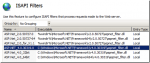
ISAPI Filter ‘C:\Windows\Microsoft.NET\Framework\v4.0.30319\\aspnet_filter.dll’ could not be loaded due to a configuration problem. The current configuration only supports loading images built for a AMD64 processor architecture. The data field contains the error number. To learn more about this issue, including how to troubleshooting this kind of processor architecture mismatch error, see http://go.microsoft.com/fwlink/?LinkId=29349.
Look closely and you will notice above that there’s a double \\ in the path name.
Once I’ve modified it to remove the double \\ and done an IISRESEt – it’s all working just fine. The picture below shows the problem line AFTER I’ve modified it.
Tags: SBS 2011, SBS 2011 Standard
Posted in Blog | 2 Comments »
Friday, February 24th, 2012
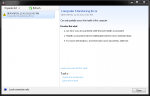
Since I installed the latest BPA on my Western Digital DX 4000 which has Windows Storage Server 2008 R2 Essentials on it, I’ve had the alerting pop up with a Computer Monitoring Error as you can see in the screen shot below. This alert pops up on all the client machines that are connected to the server. I’m not the only one to have seen this however, a number of fellow MVPs have seen this too. Together we’ve figured out that the latest Best Practice Analyzer (BPA) is the culprit and that removing it from the server has “resolved” this issue for the moment. Microsoft are aware of the issue and are investigating it at the moment.
This error also occurs on other servers that use the same Best Practice Analyzer including SBS 2011 Essentials and Windows Storage Server 2008 R2 Essentials.
I’ll report back here once I know of a solution – for now, I suggest that you install the BPA and then after you’ve run it to determine the health of your server and rectified anything that needs to be fixed, remove the BPA.
Tags: Best Practice, BPA, SBS 2011, SBS 2011 Essentials, Western Digital, Windows Home Server 2011 Premium, Windows Storage Server 2008 R2 Essentials
Posted in Blog | 1 Comment »
Thursday, February 23rd, 2012
The Best Practice Analyzer is designed to review your server for any known issues that the Microsoft Support Team are aware of and to show you how to resolve those issues. This FAQ shows you how to install and run the BPA for the first time.
The information in this FAQ pertains to Small Business Server 2011 Standard, Small Business Server 2011 Essentials, Windows Storage Server 2008 R2 Essentials.
1. Download the Microsoft Baseline Configuration Analyzer 2.0 first from Microsoft here
2. Install it onto your server directly. No reboot is needed.
3. Download the Windows Server Solutions Best Practices Analyzer 1.0 from Microsoft here
4. Install it onto your server directly – again no reboot is needed. During the installation make sure you leave the options below enabled
5. Once the installation is complete, run it from the icon on the desktop. Pause for a few moments and look for the Update icon below.
6. Click on the icon to download and install the update install the update
7. Once you’ve installed the update, you will need to restart the BPA in order for it to run.
8. Select the option to scan your computer
9.Review the report
10. Select one of the options to expand the warning and it will show you what you need to do to resolve that issue.
All in all – it’s a very simple tool to run and will help you quickly evaluate common issues on these servers.
UPDATE: 24th Feb 2012 – it’s come to light that there may be an issue with the BPA with the that causes Client Alert notifications. See this post for more information
Tags: Best Practice, SBS 2011, SBS 2011 Essentials, SBS 2011 Standard, Windows Home Server 2011, Windows Storage Server 2008 R2 Essentials
Posted in FAQs | No Comments »
Wednesday, February 22nd, 2012
Well the tool was called the SBS Best Practices Analyser (Analyzer for the US guys) but it’s been called the Windows Server Solutions BPA since it was re-released for the SBS 2011 platform.
Microsoft have released an update for this just this week. They announced it here. The BPA works on SBS 2011 Standard Edition, SBS 2011 Essentials, Windows Storage Server 2008 R2 Essentials and Windows MultiPoint Server 2011.
It’s 100% best practice to run this tool over any new installation that we do as well as any new site we inherit as it really helps to see if there are issues that we can solve quickly that Microsoft already know about. Get the update now and check it out.
Tags: SBS 2011, SBS 2011 Essentials, SBS 2011 Standard, Western Digital, Windows Multipoint Server 2011, Windows Storage Server 2008 R2 Essentials
Posted in Blog | No Comments »
Tuesday, February 21st, 2012
I hear so many stories from friends about the lack of value that the companies they work for place on the IT systems in their business. One of the most common things I hear about are problems with websites caused by web designers, or other such people. Ultimately there’s a sliver of truth in there somewhere, but just the same, the business owner often disavows all knowledge or responsibility because they didn’t have a backup or some such issue. With the move to cloud services being a big thing, one of the things most consumers don’t recognise is that most cloud services do not hold responsibility for backing up your data. That responsibility is with you – not them. One such story in the news this week is of a popular website that has gone for good. You can read the story here but in essence, the business owner who bought the site 4 months ago, didn’t have a backup of his own website. He attempted to move it from one service to another and inadvertently cancelled the wrong service resulting in the deletion of the only copy of his website. In this case, his website WAS his entire business. I feel sad for the guy – really I do. However I can’t help but wonder how things might have been different had he had an SMB IT Professional working with him to conduct the move. These are the types of things that we consider on behalf of our clients day in, day out. These are the types of risk that we aim to reduce from occurring.
Do you have an SMB IT Professional working with your business for your IT requirements or do you think “it’s easy – my son could do it…”
Tags: SMB Community, SMB IT Professional, SMBiTPro
Posted in Blog | 1 Comment »
Monday, February 20th, 2012
I reported a few weeks back about Robert Cranes upcoming SharePoint training course. I hear that positions are filling fast and the course is on in just two days – therefore if you’ve not registered yet, now is the time to do it. You can find out more about the course and register directly with Robert for it here.
Tags: Events, Office 365, SharePoint, Training
Posted in Blog | 1 Comment »
Saturday, February 18th, 2012
I’ve had many people say that they’ve gotten great value from this blog and the work I’ve done in the SMB community over the years. I’ve also heard that said about many of my SMB peers, from those that run blogs, presentations and community groups. Last year I was fortunate enough to be voted into the top 150 SMB Influencers along with a number of my peers as well as people I’d not heard of. If you think I or any other SMB IT Pro has been of great influence to the SMB community then now is your chance to vote for them. You can vote here if you chose to ![]()
Tags: SMB Community, SMBNation
Posted in Blog | No Comments »