Archive for May, 2012

WD DX 4000–Software Update Available

Thursday, May 31st, 2012

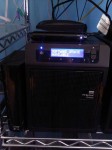
I really like my WD Sentinel DX 4000 – it’s great little product for me and I’ve actually got two of them in the SBSfaq.com offices.  I walked into the office this morning though to see the display below on them “Software Update Available”.  This is cool and I’d love it if my normal servers would do the same – makes it nice and simple to see what is going on.

WP_000136

Ok – so it needs an update – I decided to dig into it some more to see what that really means – after all this is the first time I’ve seen this displayed on this system.

I checked the alerts first up and as you can see below, there’s a WD Sentinel Software Update Available – unfortunately though it does not tell me much about how to get the update applied.  Maybe that can improve there and give me more information.

image

So I did some digging into it.  After a little bit, on the Monitor tab of the Dashboard, I found the screen below.  I found that if I clicked on the “Check for Updates” button that it would come back and tell me that there were updates available, and it would then give me the option to download and install the updates.  It warned me that it would need to do a reboot when it did this, so I went ahead and told it to proceed.

image

Whilst it was doing the update, it displayed “Updating Software” on the front LCD panel of the WD Sentinel – a nice touch for sure.  The entire process took maybe 5 to 10 minutes and it rebooted – I noticed it was up again when it showed me the normal LCD screen.

I logged on to the Dashboard and checked the versions and sure enough – it’s updated.

image

I checked WD’s website and found out they have a list of fixes here in a PDF file.

Ok – so a few suggestions for WD.

1. Use the Alert to show me where to go and what to do to make the update happen.  I don’t want to have to dig around for it

2. Why not have the LCD panel ALSO alert me to when there are Windows Updates available for it?

Tags: , ,
Posted in Blog | No Comments »

How to catch a Fake AV Scammer

Tuesday, May 29th, 2012

This is just gold.  I highly suggest that this video is mandatory watching for all my clients, friends, parents, relatives, anyone that uses a computer.  These type of scammers have been calling people here in Australia now for quite a few years, but only recently have they spread to other regions of the globe.

It all starts with a phone call you get on your home phone.  The caller indicates that they are from “Technical Support” or some similar company and they tell you that there’s some problem with your computer and that they are there to help you resolve it.  The scam then involves them walking you to a website to install some very valid remote control software after which they then proceed to show you all the “problems” with your computer and request money from you to “fix” them.

Be warned – NO ONE WILL EVER CALL YOU TO HELP YOU WITH YOUR COMPUTER….unless of course you have a prearranged and PAID relationship with them – i.e. – your IT support company or your son (yes Mum, I’m talking to you here) Smile


Breakdown of a Fake AV Scammer

Tags: , , ,
Posted in Blog | No Comments »

Want some free Windows 8 training?

Thursday, May 24th, 2012

Earlier this year I attended MVPNation in Seattle in March.  During this conference, a number of MVPs across various disciplines, presented sessions around Windows 8 and Windows 8 server that gave a deeper insight to anything that Microsoft had previously done.  This content is now being made available for free by SMBNation (the conference organisers).  So if you want to check out a heap of deep content on Windows 8 and Windows 8 server, take a look here

Tags: , , ,
Posted in Blog | No Comments »

Have you listened to a podcast lately?

Thursday, May 10th, 2012

Going back a few years, I used to listen to podcasts all the time.  These days, honestly, I don’t do that so much.  Robert Crane has been doing a number of podcasts now quite some time and I’ve saved a few to listen to when I take trips.  Here’s the most recent ones that I think sound pretty cool indeed.

Alan Burchill – Group Policy

Shane Hoey – PowerShell

Tim Barrett – SBS, Multipoint Server, and Storage Essentials

Ishai Sagi – Sharepoint, Office365

Kevin Royalty – Multipoint and WSSe

Arlin Sorenson – Peer Groups and Community

David Wales – Managing a Service Desk

Ryan Spillane – Finding and recruiting good staff

Honestly – there’s a lot more there that you should check out yourself.  Here’s Robs site

Tags: ,
Posted in Blog | 1 Comment »

Are you an SBS Survivor?

Wednesday, May 9th, 2012

I just love this concept by our Sydney SMB IT Pro president Robert Crane.  Robert has been planning our next twilight workshop and he’s come up with a very novel idea for it… his words below…

In a ‘post-apocalyptic’ universe where evil ‘cloud terminators’ dominate the technology landscape there remains a ragtag handful of SBS specialists roaming the streets surviving only by selling managed services and fixing broken technology. This rare band of highly skilled, but socially awkward individuals, comes to together but once a year to pit their skills against each other in a battle of nerves and speed. Their challenge is to build a Microsoft Small Business Server (SBS) 2011 Server on a virtualized base in the shortest possible time.

There are few rules in this arena, where only the fastest survive to be crowned ultimate ‘SBS Survivors’. The challenge pits two teams together in the same room with the same hardware against each other and the clock. They are allowed to use any means , fair or foul, to achieve the result, however they will not be provided with the domain name of their network until the day of the challenge. The winner will be the team that achieves an SBS best practices analyser report with no errors or warnings.

Clans are now being recruited so fly the flag, show your colours and join up with your peers to smash the opposition in this unique challenge. Spectators are also more that welcome to attend and witness the spectacle (heckling, jeering and cajoling is also more than encouraged).

To register for the event visit – http://smbitpro-syd.eventbrite.com.au/. The cost is $44 INC GST for SMBIT Professional Members and $ 99 for non-members. To register for either Team Ravenclaw or Team Gyffindor please email director@ciaops.com.

May the best ‘SBS Wizards’ win!

Well given that Ryan Spillane and I set the World Record for installing SBS 2003 R2 back in 2006 at SMBNation, we can’t let this one pass at all.  I’m up for defending my crown and I’ve already got quite a few tricks up my sleeve… now the only choice for me is which team do I pick to be on… or do I try and throw a real game changer and invent my own team… <evil laugh>

One way or another this next SMB Twilight workshop is set to be a good one.  Lots to learn between now and then for sure.  The only question is… will YOU be there…

Tags: , ,
Posted in Blog | No Comments »

Desktop to Cloud Event

Tuesday, May 8th, 2012

Ok – this is a reminder for you – Robert Cranes Desktop to Cloud event is coming up real soon.  I originally mentioned it over a month ago now here

Well the good news is that Roberts been able to pull some top notch talent in for this event, and the agenda is packed to the brim full of good learning.  Here’s a few names you might know that are speaking at this event….

Dean Calvert

Boon Tee

Mark O’Shea

Jeff Alexander

Roger Lawrence

Ishai Sagi

and of course Robert Crane himself.

This looks to be a pretty good local event, and if it were not for prior commitments, I too would be there.  Check out the full agenda and book here

Tags: ,
Posted in Blog | No Comments »

Desktop to Cloud Event

Tuesday, May 8th, 2012

Ok – this is a reminder for you – Robert Cranes Desktop to Cloud event is coming up real soon.  I originally mentioned it over a month ago now here

Well the good news is that Roberts been able to pull some top notch talent in for this event, and the agenda is packed to the brim full of good learning.  Here’s a few names you might know that are speaking at this event….

Dean Calvert

Boon Tee

Mark O’Shea

Jeff Alexander

Roger Lawrence

Ishai Sagi

and of course Robert Crane himself.

This looks to be a pretty good local event, and if it were not for prior commitments, I too would be there.  Check out the full agenda and book here

Tags: ,
Posted in Blog | No Comments »

Useful Powershell commands for Exchange

Monday, May 7th, 2012

Here’s a few useful commands I regularly use in Powershell for Exchange management.


How can I list all users mailboxes on a given server?

Get-Mailbox –servername SERVER1

How can I list a users mailbox size?

Get-MailboxStatistics –identity “Wayne Small – SBSfaq.com” | select TotalItemSize

How can I list all users mailbox size on a given server?

This is a little more tricky – here’s a site that I grabbed a script from which did it very nicely.

Tags: , , , ,
Posted in Blog | No Comments »

Upgrading to SafeSync for Business 5.0

Monday, May 7th, 2012

I’ve been running Trend Micro’s SafeSync for Business for a while now (over 12 months from what I can recall).  The version I’m on is version 3 and a little while back now, they released v5.0.  I decided this weekend as I’m doing some planned work, that it’s time to upgrade and see what it has to offer.  I run this on both my desktop and my laptop and I use it to keep files in sync between the two and also to share specific folders and files with my team.

Here’s my record of my experience with upgrading from SafeSync for Business 3.x to 5.0

Firstly – here’s what I’m running now.

SNAGHTML4a4b14

I started by making sure that I had a good backup of my desktop and laptop – that way if anything goes wrong, I will have a rollback plan that will mean my data is protected.

I decided I would upgrade my desktop first, therefore I ensured that my laptop was logged off SafeSync for Business so that it would not have any issues while I did the upgrade on both machines.

Start by downloading the client software from here

Once the download was done, I ran the installation program and followed the bouncing ball through the installation process.

SNAGHTML543b7b

SNAGHTML546c6a

SNAGHTML5503e8

SNAGHTML565783

SNAGHTML56b165

After the restart, I noticed one major issue for me.  My Online W: drive – which was the drive letter I gave to SafeSync, was gone… ohhh so that’s what they meant by that first couple of screens.  I’m not happy at all about this change. The ability to have a drive letter on my computer and copy things directly to the cloud WITHOUT having to have them sync’d across all my computers was in fact a benefit to me.  Now it appears due to the change in functionality, I will be FORCED to use the web interface to do the same thing.  Sorry Trend – that’s not a step forward, it’s a step backward.

Below you can see my W: drive that I used to have along with the contents that I had there.  The Software folder was one that I used that was NEVER sync’d to my computers as it allowed me to easily keep copies of software that I use so I can install them without having to go to various vendors websites all the time.

image

image

Ok – so the upgrade went fine, but there’s at least ONE feature I have lost.  I decided to poke around and look at the settings for SafeSync for Business 5.0

SNAGHTML108bea

SNAGHTML10fbcb

SNAGHTML112626

SNAGHTML1148d2

After upgrading my desktop, I told SafeSync for Business to logout.  I then proceeded to do the same upgrade on my laptop.  The upgrade for it also went fine, so nothing major to report there.

I am however concerned about the change in functionality that Trend have done with this.  The offline drive was something I used a LOT, now I’m going to be forced to use the web interface to do the uploads which is not ideal at all.  I would suggest quite highly to Trend that they reconsider this and restore this feature to SafeSync for Business .

Trend also have a SafeSync Blog where you can find out lots of info including the details of the monthly feature updates on the SafeSync blog here.

Tags: , ,
Posted in Blog | 1 Comment »

How to troubleshoot Client Connector Install issues on SBS 2011 Essentials

Thursday, May 3rd, 2012

I was helping one of our techs out when he was deploying SBS 2011 Essentials for a client this week. He had a couple of computers that crashed with errors when the Client Connector Installation was going through.  I commenced to dig into the log files and also put together a blog post when I hit a problem I didn’t know about.  I turned to Google and low and behold, I found this excellent article from fellow MVP Rob Pearman on Troubleshooting Client Connecter Installation problems.  Not being one to reinvent the wheel unless I can do it better, I figured I’d help get some awareness of the things he’s done.  So if you are having issues with Client Connector Installation Failures on SBS 2011 Essentials, then check out Robs post above.

Tags: , , ,
Posted in FAQs | No Comments »