Friday, June 29th, 2012
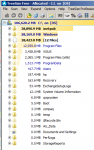
I’m sure you’ve had clients servers disks fill up on a regular basis right? Here’s a cool tool that is free that you can use to quickly figure out where it’s all gone. TreeSize Free from JAM Software is a free tool, you can download it here but I’ve also paid for the Professional Version for my own systems.
As an example – here’s an example of a servers hard drive that filled up on one client today.
I then ran my disk cleanup script which you can download from here and did a refresh on the tool above and suddenly my disk is not so full anymore ![]()
Tags: SBS 2008, SBS 2011, Software I use, Tools, Windows Server 2008, Windows Server 2008 R2
Posted in FAQs | 1 Comment »
Wednesday, June 27th, 2012
Believe it or not, this little gem is one I learned over 20 years ago now when I worked for AST Computers. We had a need to exercise some hard drives and one of the tech team there wrote this quick but simple batch file to do so. Copy the following lines to Notepad and then save it as a file called t.bat.
Copy t.t + t.t t1.t
del t.t
ren t1.t t.t
dir
t.bat
Now you’ve saved it as a file called t.bat, copy t.bat to t.t
You can then run the file. It basically doubles in size over and over till it runs out of disk space at which point it will error out. Simple, but effective… this simple batch file helped us find a critical flaw in our AST computers when running under OS/2 that we had sold to a major insurance company at the time.
Tags: Scripts, Software I use
Posted in FAQs | No Comments »
Tuesday, June 26th, 2012
Karl Palachuks SMB Online Conference starts in just a few hours – it’s not too late to register for it here. Ok – so it’s not in your timezone – that’s fine – Karl is giving all registered attendees, 12 months access to all the sessions, so you can review them in your own time as many times as you like. This is a 3 day event for a low price of only $399. I wish Karl all the best and can’t wait to review the sessions when I wake up tomorrow morning to see what I’ve missed ![]()
Tags: Conferences, SMB Community
Posted in Blog | No Comments »
Tuesday, June 26th, 2012
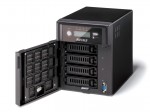
Recently Buffalo approached me with an offer to try out their products to see if they had a fit for our clients in the SMB market. Given I’m playing with a few NAS devices at the moment, it was a great chance to take a look at something I’d not seriously done before. The local Aussie representative from Buffalo, Boris, kindly offered a Buffalo TeraStation Pro WSS Quad 4TB unit for an evaluation so I could get a good feel of how it performed.
The unit arrived well packaged and upon opening, I found a CD and small USB key which were both needed to get the server up and running. The unit is physically quite small with a single power supply. The power supply does have a cable lock that will prevent the cable being accidentally removed which I thought was a good touch. There’s a front Panel LCD which shows a stack of useful information. The downside though and something I didn’t like about it was that the LCD can only be read up close. The light blue on blue background made it impossible to see across the room which was a detraction from the overall tidy looking front panel.
Setting up the unit was quite simple with easy to follow instructions. The LCD display tells you what’s going on along the way, so it’s simple for an SMB to setup. The only improvement they could make here is with the 8GB MicroSD & USB reader they supply – the instructions don’t tell you that you need to put these together to for the installation process, and I can see non experienced SMB clients, missing this point.
Once the base setup is complete, you have essentially, a Windows Storage Server 2008 R2 Workgroup edition system. You need to add it to the domain like you would a normal Windows Server and you do this by accessing the server via RDP.
Now the unit I have for testing has 4 x 1TB drives in it. Once I added it to the domain, I was able to see more about what is under the covers. I found they are using the Microsoft Windows OS based RAID for both the boot drive and the data drive.
I guess I had assumed they would have a RAID controller of some kind in there, and was surprised that they didn’t.
I setup some shares on the unit and then went about testing it’s performance as a file server. While I didn’t record any performance figures, I found it to be quite responsive to everything I threw at it. I decided to use DFS-R to add this server to my production network and copied over around 2TB of data to it. Again it performed flawlessly.
From an external perspective, there’s a few things of note on this system. Firstly, it has two NIC connections, these are not automatically bonded together so you can configure it however you like – even on two separate LANs if you chose. Nothing to configure – nice
Then you have two USB 2.0 ports AND two USB 3.0 ports on the back that you can use for printers, backup devices or additional hard drives. There’s also a serial connection to allow you to connect this to a UPS. Check out the pic below for a better idea of what is here.
Given that this NAS has Windows Storage Server 2008 R2 Workgroup edition, it has a few tricks up it’s sleeve that the WD unit does not have. For one, it can be used to host iSCSI targets, and that means I can use it with my Hyper-V environment and in other environments that I use iSCSI devices. This is where the Buffalo unit comes above some of the other entry level NAS devices aimed at SMB. It’s ability to be used as an iSCSI target gives it wider appeal for the larger SMB client.
Let’s talk for a minute about Windows Storage Server 2008 R2 Workgroup. It’s got limits, like most MS products, and it’s important to understand what those limits are.
Windows Storage Server 2008 R2 Workgroup edition has the following constraints placed on it by Microsoft.
Ok – now we’ve got that out of the way, we can see that this unit is really designed for the SMB space with 25 users or less. It can be used as an iSCSI target however which makes for good, cheap, reliable storage if you have a need for that. It would be ideal too in small branch office environments provided you are under that number of users.
Overall, this is a great little unit. I’m a little disappointed in the software only based RAID and the front panel LCD screen. It does however win points for having the ability to be an iSCSI target which gives added flexibility depending on the scenario you use it in. Pricing for this unit is higher than units including Windows Storage Server 2008 R2 Essentials, so I’d recommend looking at your business needs before deciding on what style of device you really need.
Tags: Buffalo, NAS, Windows Storage Server 2008 R2, Windows Storage Server 2008 R2 Workgroup
Posted in Reviews | No Comments »
Monday, June 25th, 2012
My laptop is the subject of a lot of different software. I use it every day to do many things and often trial software on it. Over the last few weeks maybe more, however I have noticed a problem with it. I’ve noticed that the icons on my desktop simply stop responding… everything else works, but you can’t select or click on anything on my desktop. At first I suspected one of the guys in the office had replaced my background with a picture of my desktop and it’s icons, but a quick check confirmed that this was not the case. How did I troubleshoot this problem?
Well first off I rebooted. I checked to see if the problem was there and it was not. Everything worked fine. Ok – so I wondered what was causing it and went about my doing my work. It was not long before I had several applications open, Outlook, Internet Explorer, Word, PowerPoint etc. – all working fine. I then went to minimise things to get to an icon on my desktop and found it was broken. Ok – so I know something I did in the last 15-20mins broke it.
I checked my system for malware using Trend WFBS which I’ve got installed on this machine, and also MalwareBytes – both came back clean – so I figured I was safe there. I rebooted again and of course everything was fine. I noted down the apps I had run and did my work for 15-20 minutes – I was focused on Outlook for this entire time and I noticed that everything worked fine – including my desktop icons. I figured I could rule out Outlook. I then needed to do some testing for a client, so I opened up Internet Explorer and began testing their OWA (they had reported some issues). I remoted into their systems and fixed up the issues and at the end closed Internet Explorer. I want back to Outlook and then to my desktop at which point I noticed the desktop icons would not respond… ahhh – ok – so maybe it was something to do with Internet Explorer I thought. I opened up task manager and even though I’d closed Internet Explorer earlier, I found it was still running in task manager. I end tasked it and suddenly my desktop icons responded again. Interesting I thought.
So far I had a suspicion, that IE was causing the problem, but I had to prove it. So I rebooted again (notice that I try to do this so that I’m starting with a known clean base when troubleshooting). This time I used just Internet Explorer and accessed a few news sites, my own SBSfaq.com and the like. I then minimised IE and found that my desktop icons were in fact not responding at all. I closed IE and again noticed it was still running in task manager after it had gone. End task on iexplore.exe and desktop worked again – ok – so it’s something in IE causing the issue.
I started Internet Explorer in without any addons first up – you can do this by typing “Internet Explorer” into the search bar from the Windows 7 Start button and select the Internet Explorer (No Add-ons) option as you can see below.
IE 9 started up and ran without an issue. I surfed a few sites and then closed it. I checked Task Manager and iexplore.exe was gone as it should be. My desktop icons worked fine too. That to me confirmed that there was likely an add-on in IE that caused the problem.
I then went about eliminating which add-on was causing the problem. You can manage add-ons from the Internet Options menu and the Programs tab as below.
I listed all the add-ons and looked for the most recent dated ones first. They turned out to be the Skype Update that was updated a few weeks ago now. I disabled them and voila – the problem was gone!
I did some other testing by disabling all the other addons EXECEPT the Skype ones and the problem came back – so I was pretty certain that the Skype add-ons in my Internet Explorer was indeed causing my desktop icons to stop responding. For the moment, I’ll leave them disabled as there does not seem to be an update available for them.
I wonder how many others have seen this issue?
Tags: Internet Explorer, Troubleshooting, Windows 7
Posted in Blog | 1 Comment »
Saturday, June 23rd, 2012
I was working yesterday on a clients SBS 2008 server that we had inherited. The clients SBS 2008 install had been messed with by at least 2 IT companies before we got to them. One of the issues I was trying to resolve was that Companyweb was not working. I went through the normal things on the SBS blog that affect companyweb, but in the end it was still not working. Robert Crane – grand poobah of Sharepoint and Office 365 and well known author of the WSS Operations Guide happened to be in our office doing some other work for us. After spending some time trying to fix it myself, I relented and called on Roberts experience… and I’m bloody glad I did. What was taking me a long time to fix, was very quickly fixed by Robert using instructions he had prepared earlier. His Windows Sharepoint Services Operations Guide includes Chapter 13 which we used to resurrect the clients Companyweb with a fresh install and then reattach the databases.
The funny thing about this all was that we didn’t really need Sharepoint / Companyweb working as the customer didn’t need it. What we did need to do however was to get it working so that the SBS Internet Domain Name wizard would works so we could properly setup their Exchange for external access. The previous IT company didn’t try that and there were issues as a result. I was able to read the logs for the wizard (dpcw.log) and determine that the wizard was crashing at the point it tried to configure the Companyweb correctly. So we needed to fix Companyweb so that the wizard would work. All up – a great afternoons work – the client is now VERY happy indeed.
Now I could have kept at this for many more hours, but instead of letting my ego get in the way, I called in an expert. The expert then came in and fixed it quickly. How often do we as IT Professionals think we can solve things and we don’t want to actually call in other help? Is it just us or is it other professions as well? I know from experience that when I can’t solve something after a period of time, I find it beneficial to call on someone else’s view point – they might just have the answers you are looking for. Thanks Robert – and I highly recommend the Windows Sharepoint Operations Guide if you don’t have a subscription, get one – now!
Tags: Software I use, Windows Sharepoint Services
Posted in Blog | 1 Comment »
Thursday, June 21st, 2012
Yesterday, my WD Sentinel DX 4000 appeared to have locked up – it had stopped responding to the front panel buttons. I wondered why it had done this and then I found I had inadvertently taken it off the UPS when I re-cabled some things the other day and I suspect we had a power fluctuation which caused it to glitch. Anyway – the only way to resolve this was to hard power it. Now this is something that you normally SHOULD NOT DO to any computer, least of all a server like this. But it was my only choice.
After the reboot, I found that the front panel had advised that it was Initializing…. now at first I panicked and thought that it was erasing and initialising everything on the server. I was however able to RDP to the server and verify that my data was there. I left it and after 8 hours, it was up to 5% done. I also noticed that anything I tried to do via RDP on the DX 4000 was very slow as well. I figured that the initialisation process was very disk intensive, so I left it at that. I’d heard of this before and wondered what it all meant. I sent an email off to some people I know at WD to get some answers. Given it was late at night, and me being impatient, I later decided to reboot the server and found that it seemed to be far more responsive, however the Initializing process continued at it’s normal rate. Given my data was not at risk, and that performance seemed to be fine, this didn’t bother me.
This morning, my status was as below on the front panel.
You can see via the Dashboard, that it’s showing much the same thing – all disks are normal and my data is intact.
Ok – so the official explanation of what is going on here.
This is normal behaviour for the WD Sentinel DX 4000 under the following circumstances:
I know that WD are aware of the issue and they are looking into ways to better handle this in advance of any unclean shutdown. They have assured me that the chances of data loss are quite minimal provided I allow the initialization process to complete – which of course I am doing.
Oh – I forgot to mention – I’ve moved this back over to the UPS so that it won’t experience any unplanned failures again.
Tags: NAS, Western Digital, Windows Storage Server 2008 R2 Essentials
Posted in Blog | 3 Comments »
Wednesday, June 6th, 2012
I had an interesting discussion with my bookkeeper yesterday when she was doing the books for me. You see I use MYOB AccountRight Plus in my business to handle all the things I need. I’ve used it now for 6 years and in that time it’s worked well. In the early days I had need of support and I found the MYOB support was quite good.
I got a renewal notice in the mail in which they asked me to renew my MYOB Cover at a cost of $714.00. That’s funny I thought, I was sure I’d seen that you could buy MYOB AccountRight Plus for less than that. A quick check of Harris Technology website indeed showed that you can get it for $678. A further search on the internet showed I can get it for as low as $599 if I wanted. I asked my bookkeeper why should I renew the MYOB Cover and why not just go and buy the software again given the price they were charging. My bookkeeper basically told me that for my use, the only thing I needed was the tax tables which were provided in the updates. I honestly didn’t need any of the new features and in fact based on what I’ve heard out there in the community, the newer version was in fact causing many people big problems as it lacked many of the reports that the older version had and needed quite a bit of training to get things running. I decided at that point that I didn’t think it worthwhile to spend the $ on the MYOB Cover when in fact we could update the tax tables manually.
Coincidentally, today I received an email from MYOB with the same renewal I got in the post. I figured why not ask them about the price difference, so I did. I asked them the following.
Why is it more expensive to pay your MYOB Cover than it is to buy the product outright from Harris Technology? Why would I go with you on this when I can get the same cheaper from one of your resellers?
I sent the email and expected to not hear from anyone. Surprisingly I got a phone call within a few hours from a young lady in the MYOB customer service team (I‘ll call her Elle for this post). They wanted to answer my question personally. Anyway – Elle was most helpful. She told me that I needed cover to ensure that I got the updates for the tax tables and also so I could in future upgrade to the new all singing all dancing cloud version. Honestly – I told her that I do my accounting offline, therefore the cloud version has no value for me, and that the tax tables could be updated manually in 10-15 minutes. Also given that I’ve had no need for support for the past 5 years, why would I want to spend another $700 for features I didn’t need. Why not just wait till I need the new version and buy it?
Elle then informed me that given I was already an MYOB customer, that they would charge me $150 to “unlock” my MYOB company file so that it could be used on another copy of MYOB of the same version. That would be on top of the price of purchasing the software if I chose to buy it new. That sounds a little rich to me. I was not liking the thought that I was locked into paying MORE than a new user to continue to use the software. I told Elle that I really was not happy with this concept and that I would likely not renew my MYOB Cover. We ended the call there.
I’m left wondering though about the tactics MYOB are employing here and I’ve got to seriously consider, is this something that I need? Is this really showing loyalty to a customer who has purchased your product for years in which you are effectively charging them MORE to stay under maintenance than a customer who has purchased their product for the first time?
Personally – with all the bad comments I’ve seen about upgrading from MYOB 19.6 to the new improved SQL based version, I really don’t think that I need to do the upgrade at all. I certainly don’t need the Cloud version that they talk about as I much prefer to do my accounts offline, sometimes whilst in transit on planes which don’t have any connectivity. Sorry MYOB, I don’t see enough value in this, so I think that I’ll skip this upgrade.
Naturally your case may vary and you need to make your own assessment, but I still have concern over the concept of customer loyalty that means existing clients pay more than new clients year on year for the same product. What are your thoughts on this?
Tags: MYOB, Software I use
Posted in Blog | 13 Comments »
Monday, June 4th, 2012
Since this site started in November 2000, I’ve focused pretty much on SBS as it’s been the core product that I’ve built solutions around. It’s been that way now for many many years. However over the last few years, you’ve seen that I’ve expanded the scope of the site a little more and I’ve covered other topics including things such as Cloud Services, Essential Business Server and even non Microsoft solutions such as TrendMicro, StorageCraft and BackupAssist. That’s been pretty much inline with the space that I’ve been living in and servicing.
Shortly, I’ll be making some changes to this site. Whilst the domain name of SBSfaq.com will stay, it no longer will be about Small Business Server Frequently Asked Questions. It will be all about Small Business Solutions & Frequently Asked Questions. It’s not just a change of name either.
Why the change I hear you ask? Well honestly, it’s about the fact that there’s a lot more to the Small Business Solutions I’ve been out there implementing than JUST the server. Sometimes there’s no need for a central server now with Cloud solutions. Likewise, given I’ve typically written about more than just SBS over the last few years, therefore I figure it’s both timely and fitting to make the change.
I’m also planning to open up the blog and have guest bloggers giving their view on their particular area of expertise. Things that will be covered in more detail soon will include Office 365, Intune and other upcoming products from various vendors. That however is just the start of the things I have in mind.
In all this, I’m planning not to alter the URLs that people have come to use and reference. I know from experience that changing the structure of the website can be painful for you, and that given that many people come to me via Google and Bing, that it’s so very important to ensure that the content is just as easy to find as it has been in the past.
So – here’s to a new era in SBSfaq.com – thanks as always for your readership, comments and contributions. I look forward to catching up with you at group meetings, conferences and wherever I travel.
Tags: Intune, Office 365, SBSfaq
Posted in Blog | No Comments »
Friday, June 1st, 2012
Come and get it… Microsoft today released the final public preview of Windows 8. You can get yours here.
Windows 8 has the following minimum system requirements, which basically means any PC sold over the last 3-4 years can run it.
Additional requirements to use certain features:
Bear in mind, this is still beta product and you don’t want to go running it in a production environment without full vendor support.
Tags: Beta Product, Windows 8
Posted in Blog | No Comments »