Archive for July, 2012

No Exchange servers are available in any active directory sites during migration

Thursday, July 26th, 2012

Doing an a migration today from Exchange 2003 to 2010 and once I’ve installed the Exchange 2010 server, I rebooted and logged back on to it.

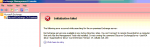
I got the following error “No Exchange servers are available in any active directory sites.”

image

After a little investigation, I realised that I was logging on with the local administrator account rather than the domain administrator account.  Doh!!!

Log off and back on using the RIGHT domain account and it works fine now!

Tags: , , ,
Posted in Blog | No Comments »

Microsoft Camera Codec Pack

Friday, July 20th, 2012

I stumbled across this one on the Microsoft Download site when looking for something else altogether.  It’s the Microsoft Camera Codec Pack and it’s a piece of software that once installed will allow you to use native Windows to view a wider range of images than before.  I will also allow you to view RAW format photos that many cameras produce.  I’ve tried this with my Canon 650D and it can easily display some of those RAW format photos I took of the Grand Canyon last year.

You can download the Microsoft Camera Codec Pack here

Tags:
Posted in Blog | No Comments »

How to mirror a directory structure without the files

Friday, July 20th, 2012

Have you ever needed to copy or replicate an entire directory structure without the files themselves?  I’ve often needed to do that when setting up some USB hard drives for offsite replication with ShadowProtects ImageManager.  I found a nice simple way to do it with the Robocopy command

robocopy E:\SPBackup F:\OffsiteBackup /e /xf *.*

That command basically tells it to copy all the directorys in the SPBackup folder over to the OffsiteBackup folder even if they are empty, but to exclude the files themselves.  Works a treat!

Tags: ,
Posted in FAQs | No Comments »

Mouse without borders – very cool utility

Wednesday, July 18th, 2012

I was sitting at my desktop last week with it’s 4 LCD screens and on the right hand side I have my laptop.  I was thinking about how cool it would be to be able to move my mouse from the desktop to the laptop and still use it.  Microsoft must have been reading my mind, because this week I found out about a utility called Mouse without borders.

This cool utility will allow you to seamlessly move your mouse from one computer to another with up to 4 computers in the link.  The keyboard will also work across whichever computer the mouse is on at the time.  How cool is that???

You can find out more about Mouse with Borders here and you can download it direct here

Tags:
Posted in Blog | No Comments »

Where can I get the product key for Windows Server 2012 Essentials Beta?

Sunday, July 15th, 2012

If you are installing the public beta for Windows Server 2012 Essentials, you will have found that you can’t install it without the product key.  You might have missed it, but it was displayed down in the Instructions section on the downloads page here

Good luck with your testing Smile

Tags: , , ,
Posted in FAQs | 1 Comment »

StorageCraft unbeatable NFR offer for Aussie and Kiwi Resellers

Sunday, July 15th, 2012

Last week, in amongst all the fun of the Windows Server 2012 announcements, StorageCraft Australia announced a pilot trial of a new reseller program only available for Australian and New Zealand resellers.  The announcement here tells how you can get a pack of StorageCraft licenses for ShadowProtect, ShadowStream, Intelligent FTP and Head Start Restore for only AUD$ 200.00.  Now before you go thinking about how you can sell these to your clients – stop right there!  This is limited to one pack per reseller and it’s specifically for you to be able to get your hands real dirty with the product and play with it in your own production environment.

What you get for your investment is…


What that gives you in a nutshell is the ability to build, test and learn all aspects of ShadowProtect, replication and head start restore.  End result will be that you’ll have a far greater understanding of how things work and therefore you will be more easily able to talk to customers about how this works for you in your office.

Tags: ,
Posted in Blog | No Comments »

Windows Server 2012 Essentials and Third Party Products

Friday, July 13th, 2012

It’s great that the public beta of Windows Server 2012 Essentials is out now.  It means that the general public can all get hold of it and test it.  I’d highly suggest you do this ASAP.

What you need to consider though is that many vendors of third party products will also need to test and potentially modify their products to work with the new architecture within the Windows Server 2012 platform.  It’s not reasonable to just assume it will work as there’s been a lot of change under the covers.  Items such as StorageSpaces are bound to have an impact on things like Antivirus software and third party backup programs.  Other changes such as within IIS are likely to affect software such as Kerio’s Connect mail system.  Personally I’ve not tested any of these on Windows Server 2012 myself, so I can’t comment on how they work, but we will need to see guidance from them before assuming “it will just work”.

The one vendor that I do know is working closely with Microsoft is Trend Micro.  They’ve announced an alliance of some sort that sees their Worry-Free Security Services running on Windows Server 2012 Essentials already.

Vendors to watch for during this period will be StorageCraft, Trend Micro, BackupAssist, Symantec as they typically have close relationships with Microsoft and will have been testing themselves during the beta of Windows Server 2012.  They might however have not released anything publicly and therefore you will need to talk to them direct about their stance with this new product.

Tags: , , , ,
Posted in Blog | 1 Comment »

Windows Server 2012 Essentials and HP – Better Together

Friday, July 13th, 2012

Microsoft and HP did a joint announcement this week at the WorldWide Partner Conference about Windows Server 2012 Essentials and HP Servers.  You can check out the video below that was done by the HP Coffee Coaching team.

David Fabritius is one of the key guys on the Product Marketing Team for Windows Server 2012 Essentials and Lucy Ellis is the SMB Server Product Manager from HP.

Tags: , , , , ,
Posted in Blog | No Comments »

More links and info on Windows Server 2012 Essentials

Thursday, July 12th, 2012

Ok – here’s a few more links you will need in order to get the best out of testing the beta of Windows Server 2012 Essentials.

Forums

Tech Center

Windows Server 2012 Essentials Tech Library

Windows Server 2012 Beta Essentials Datasheet

FAQ

Make sure you check out how you can run DirectAccess and an On-Premises Exchange server as well.

Tags: , , ,
Posted in Blog | No Comments »

Windows Server 2012 Essentials–Public Beta now out…

Thursday, July 12th, 2012

Well – Microsoft have now released a public beta for Windows Server 2012 Essentials.  Now you can try it out for yourself and find out if it’s going to do everything you need to do for your clients.

Joe Nalewabau, the Group Program Manager for the Windows Server Essentials team announced the beta here

Over the next few weeks I’ll be publishing a number of articles delving deeper into the product as well as comparisons of it vs. previous products with advice on how you can fill in any gaps for your clients.

Go on… what are you waiting for…. check it out!

Tags: , , ,
Posted in Blog | No Comments »