I posted a while back about Exchange 2007 SP3 being released. This weekend I finally got the time to do the upgrade myself. It went through seamlessly. Here’s the procedure I used.
Make sure you have a backup of your server and that you have tested that it can restore.
Download the Exchange 2007 SP3 from Microsoft – here – you will want the 64bit version.
Stop all Antivirus Services – if you are using Trend – here’s the list that I stopped. If when you try to stop the services you find that the stop option is greyed out – check out this FAQ.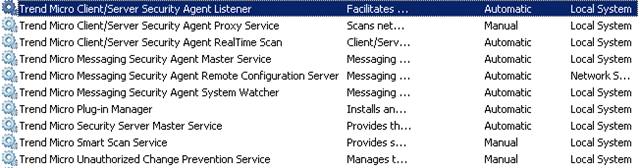
Extract the Exchange 2007 SP3 to a folder location on your server.
Locate the setup.exe and Run As Administrator. Select Install Microsoft Exchange Service Pack 3 from the Install section of the screen.
Setup will go through some prequalification checks to ensure that you have all the right things ready for the service pack installation. If there is a problem it will show you as per the screen below.
Ok – so my readiness check failed – showing that the DataCollectorSvc was using some of the files that Exchange 2007 SP3 will need to replace. A little digging with Task Manager shows that this is the Windows SBS 2008 Monitoring Data Collector Service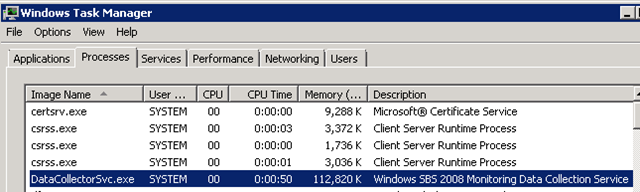
There is no such service per se in the Services MMC – it is in fact called the Windows SBS Manager Service.

I stopped the Windows SBS Manager service and clicked on the Retry for the Readiness checks and it’s all good to go once more. Select the Upgrade button and we’re on our way. Sit back, make yourself a cuppa coffee or tea or go have lunch. This will take a while.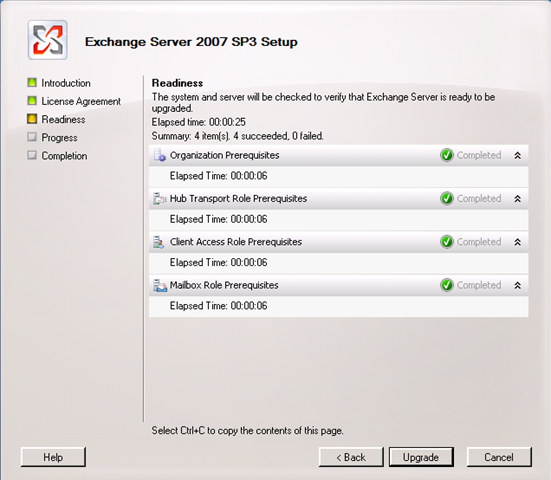
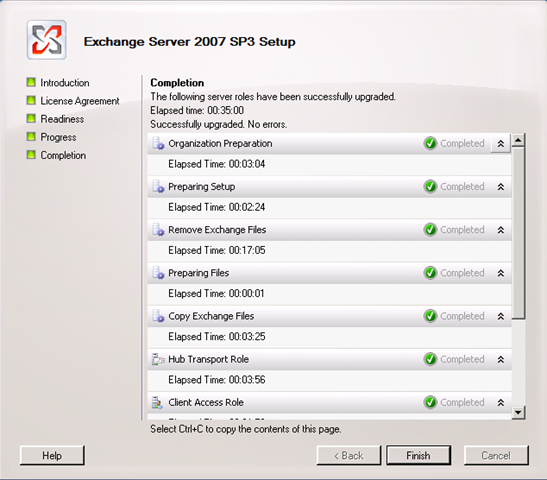
Ok – after 35 minutes now, my upgrade is complete with no errors
Now to restart the services we stopped earlier – don’t forget now 🙂
Once the services have restarted, do some testing. I tested the following;
- Email in and out
- OWA access from a remote site
- ActiveSync from my HTC Windows Mobile phone
All looks ok – so the last thing to do is to do a server reboot. The Exchange services pack didn’t ask for a reboot, but I make it a best practice that after anything major like this, to do a reboot. This way if there are any issues relating to the service pack I will know about them sooner than later.
Update December 20, 2010: You will want to check out this blog post also for information on Update Rollup 2 for Exchange 2007 SP3
Can you tell me if SP3 is cumulative or wether I need to go through the process of installing SP1 and SP2 beofore going for SP3?
Service packs are always cumulative – so you can apply SP3 right over the top over whatever you have now.
Looking at your list of Trend Micro services, would I be correct in thinking you are running Worry-Free Business Security Advanced? If you are, what version is it as I was under the impression Trend Micro don’t support WFBS 6.0 on Exchange 2007 SP2+?
Craig,
I was unware that they did NOT support SP2 or SP3 till I went to the Trend website – it does not mention SP2 or SP3 but I fully expect Trend to support it. I have asked them to rectify this ASAP.
Thanks Wayne. We have had direct confirmation from Trend Micro that WFBS 6.0 doesn’t support Exchange 2007 SP2/SP3. We have been informed that they will provide a license for ScanMail for Exchange 10 to customers running WFBS Advanced who want to install SP2/SP3 on Exchange 2007.
They have told us WFBS 7.0 will introduce support for Exchange 2007 SP2/SP3.
It is interesting that you have installed SP3 and not seen any issues though 🙂
Craig,
I have it from the head of engineering that WFBS 6.0 SP2 DOES support Exchange 2007 SP2 already – the readme file in the product reflects that. Exchange 2007 SP3 will be supported they are testing with plans to announce support for it with either WFBS 6.0 SP2 or SP3. Currently I’m running WFBS 6.0 SP3 beta on Exchange 2007 SP3 with no issues.
Thanks Wayne, that is great to know. We had been delaying installing Exchange 2007 SP2 because of misinformation from two sources we trusted.
Where can I locate the readme file you are referring to?
I had a strange issue affecting a client’s SBS 2008 system after the SP3 install. Sharepoint would not start and gave event ID 3760 – Login failed for user ‘NT AUTHORITY\NETWORK SERVICE.
I rebooted before installing SP3 and afterwards. No other programs were run and no other patches installed. I’m not entirely convinced that an Exchange SP would cause this but just in case anybody else get’s it, the solution is here – http://www.eggheadcafe.com/software/aspnet/35827564/eventid-3760-error.aspx
Hope it helps somebody.
Thanks Wayne (not Alex ;¬), great post.
Only one thing to add – doesn’t hurt to upgrade the schema and AD explicitly in preparation:
http://technet.microsoft.com/en-us/library/bb125224(EXCHG.80).aspx
All of which sieves down to running two commands from an elevated command prompt on SBS 08 (no reboot required to install SP3 afterwards):
setup /PrepareSchema
setup /PrepareAD
Stunned that TM don’t support SP2 or SP3 – been running WFBS 6.0 with Exch 2007 SP2 installed for months without a single issue. SP3 has also reared no issues.
I had issues installing Exchange Service Packs on one SBS 2008 (also on an EBS setup), never found the cause of the issue, but all Anti-Virus and health/monitoring services were stopped beforehand. The installation failed during the preparation step of the installation phase, but after stopping and disabling all related services, leaving them in a limbo state that a restart won’t fix. To resolve this run the following sets of commands from an elevated command prompt to set them back to their default states (can copy and paste):
sc config remoteregistry start= auto
sc config MSExchangeMonitoring start= demand
sc config MSExchangeTransport start= auto
sc config MSExchangeADTopology start= auto
sc config MSExchangeRepl start= auto
sc config MSExchangeMailSubmission start= auto
sc config MSExchangeServiceHost start= auto
sc config MSExchangeEdgeSync start= disabled
sc config MSExchangeTransportLogSearch start= auto
sc config MSExchangeAntispamUpdate start= auto
sc config msftesql-Exchange start= demand
sc config MSExchangeSearch start= auto
sc config MSExchangeMailboxAssistants start= auto
sc config MSExchangeFDS start= auto
sc config MSExchangePOP3 start= demand
sc config MSExchangeIMAP4 start= demand
sc config IISAdmin start= auto
sc config W3Svc start= auto
sc config MSExchangeIS start= auto
sc config MSExchangeSA start= auto
sc config wsbexchange start= demand
Then, start the services by running:
net start remoteregistry
net start MSExchangeMonitoring
net start MSExchangeTransport
net start MSExchangeADTopology
net start MSExchangeRepl
net start MSExchangeMailSubmission
net start MSExchangeServiceHost
net start MSExchangeTransportLogSearch
net start MSExchangeAntispamUpdate
net start msftesql-Exchange
net start MSExchangeSearch
net start MSExchangeMailboxAssistants
net start MSExchangeFDS
net start MSExchangePOP3
net start MSExchangeIMAP4
net start IISAdmin
net start W3Svc
net start MSExchangeIS
net start MSExchangeSA
net start wsbexchange
net start TSGateway
net start Pop3Connector
Retry the installation, and if it fails again, re-run the commands, restart the SBS 08 and retry installing SP2/SP3. Worked for me – no damage, save my nerve-ends.
Hope that helps.
Cheers,
Chris
Thank you Wayne. I am not IT person, but with help from your article, I upgraded exchange 2007 t0 SP3 without any issue. Many thanks.
Many thanks for this.
My system also failed the readiness check initially. The extra services I had to stop were: “GFI Mail Essentials” and “Kaseya Agent” which is a piece of monitoring software loaded by our server support people. Incidentally, the “Kaseya Agent” was causing “rundll32” to lock some files and it took me quite a long time to track it down.
Hi Wayne
Mine did the same as yours above on the pre-checks and stopping SBS Manager allowed the checks to pass and I continued with the upgrade.
Unfortunately, it then stopped asking for location of exchangeserver.msi file. I browsed it to my folder where the extracted files are but it just comes up with the same thing saying a network source is not available for exchangeserver.msi
Any ideas?
Chris
@Chris Francis
I am going through this hassle as the moment, as I’m hoping to migrate away from a dying SBS 2008. If you’re having that error, check through the ExchangeSetup logs and you will most likely find issue with “Exchange2007-KB981407-x64-EN.MSP”, or something similar. It appears to be an issue with Service Pack Rollups (#10 in my case), and this will need to be re-installed, and then you’ll be good to go…
Cheers,
Stuart.
BIG MISTAKE trying to install SP3 ontop of SP2 as it has caused nothing but endless problems, i have got errors at the start, errors in the middle and errors 30-40 minutes into the install, its now 5am and im completely pissed off with this… f**k exchange and f**k microsoft for making wank buggy software. It is completly illogical why, for example, i get this one problem where it asks me for a the previous install files for sp2, first time i tried it, it didnt work 2nd time it did work now its saying the install files are the wrong product but im using the same files each time… why does it work sometimes but not others… the whole thing just makes no sense.
Perform the steps from #9
I ran into some errors when performing upgrade from SP1 to SP3. Mainly during the setup /prepareschema portion. I originally downloaded the SP3 U17 and tried to apply the update but kept failing. Error stated that the upgrade patch cannot be installed by the windows installer service and missing files and what not. So to remedy this, download the original SP3 (non-U rollouts), open the .exe and let it extract. Next go into the folder where you extracted this service pack and run from within that directory the setup /prep…stuff mentioned from Chris’s post #9 above.
Meant to add one more thing. A few other things that had to be done was you had to stop any mmc.exe processes, powershell processes (windows/exchange), for sbs 2008-stop the windows sbs manager service (data collector service), and ensure all other users are logged off of the machine (use task manager/users to review and log off as necessary). Once you performed this, within the same directory as you extracted SP3, type setup /mode:upgrade