Over the weekend, I spent some time rejigging the disk structure in my R&D Hyper-V server. I used StorageCraft ShadowProtect to backup the entire server as part of a regular backup process. I installed all the new disks into the server and then proceeded to restore all the partitions. Because I was not moving it to new server hardware, I did not do a Hardware Independent Restore at all – just a restore and then a reboot as that was all that was needed.
When I restored the server, it booted just fine, but I found that the Hyper-V machines would not start. Further digging into the situation showed the error below in the System Event Log

On Windows Server 2008 R2, there is normally a 100MB partition at the start of the 1st physical drive that contains the C: drive. This partition is used to store Boot Configuration Data (BCD) information as well as other critical files. As part of my ShadowProtect backup, I do not backup this partition at all as ShadowProtect cannot restore it.
I did some digging and found that Microsoft have some info on this error here and it tracks back to the fact that I no longer have the original 100MB boot partition with its original Boot Configuration Data information. The BCDEdit command can be used to modify this information.
If you use the BCDEdit /enum command you can get a picture of what is in the Boot Configuration Data store as you can see below on this machine.
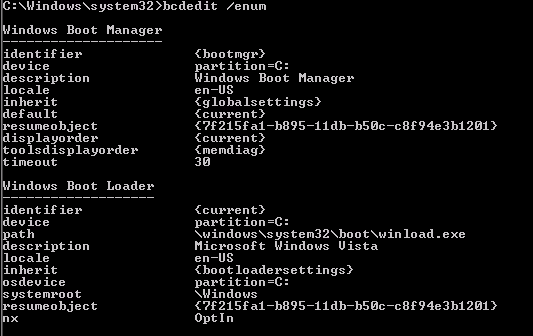
You will note there is no mention of HyperVisor.
To fix this use the following procedure
- Launch a Command Prompt with Administrative privileges
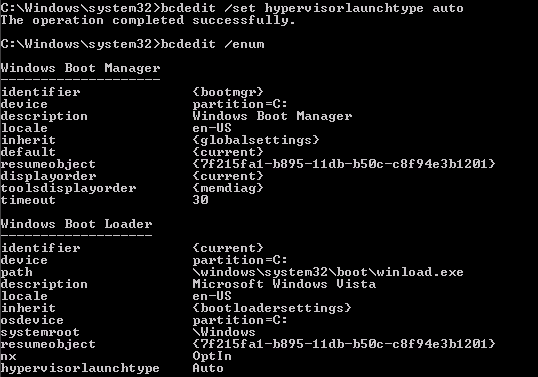
- Run the command bcdedit /set hypervisorlaunchtype auto
- Reboot – you will find the error is gone
After you’ve done that if you run the BCDEdit /enum command again you will see that you now have a HyperVisor section.
Hope this helps someone else caught in this situation.
Thanks a ton! I restored my server on to new disks from backup and had tons of problems with the bootmgr and had to recreate all that boot stuff.
This helped a bunch and worked like a charm thanks! It happened to me after mistakingly setting my active partition to another drive on my Hyper-V server then setting it back to C. That didn’t work right and the server wouldn’t boot. So i had to rebuild my BootMGR with a Windows 7 startup repair, that didn’t include the Hypervisor section. Ran this command from the dos prompt on my Hyper-V server and it rebooted and worked no problem.
Glad it helped!
Someone essentially help to make seriously articles I’d state.
That is the first time I frequented your website page and
so far? I amazed with the research you made to create this actual
put up incredible. Magnificent job!
Here is my blog post; insurance valdosta Ga (webnode.Com)
Thanks a lot! That was useful 🙂
Every weekend i used to go to see this web page, for the reason that
i want enjoyment, for the reason that this this
site conations truly good funny information too.
This is the right website for everyone who really wants to understand
this topic. You know a whole lot its almost tough to argue with you
(not that I actually will need to…HaHa). You certainly put
a brand new spin on a topic that’s been written about for decades.
Great stuff, just wonderful!
Rumor: bag Will Have A Leading role In Any Administration