I got a few CPU alerts from my Windows Storage Server 2008 R2 Essentials over the last few days about high CPU usage. I brought up Task Manager to check it out and found a process called WDFME.EXE was using up a large portion of it. I did some googling and found that this was linked to the Western Digital SmartWare software that I had installed on the system as it came with a 3TB hard drive I was playing with.
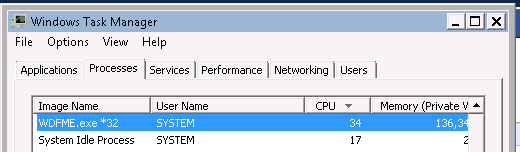
Anyway – I found additional reports indicating that others had seen this problem – from all reports so far though it seems that the easiest way to resolve it was to terminate the software and remove it. Below you can see the drop in CPU utilisation that happened once I terminated the process.
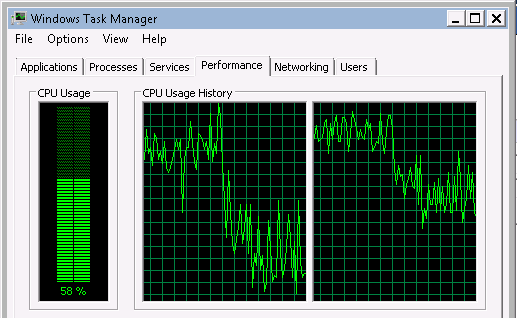
Anyway – based on the reports I’ve read – it appears to be a problem with the software at times and WD are still digging into it.
So for now – I’m removing the software and will reboot the server to get rid of the problem 
its confirmed, in my PC it takes up to 500 MB in memory!!
Thanks for the info. Currently, 06 Nov 2011, with SmartWare updated, it still slows down my system substantially. Like apparently most users of WD MyBook and similar backup solutions, I will uninstall SmartWare and be done with WDFME.EXE. Smart where? Smartware gone! Smart move!
Still, quite incredible that WD has still not got this sorted out.
Had the same problem a while ago but I fixed it by applying firmware update but it took around one month till the problem re-appeared.
So far my fix is to disable this process. Hopefully WD will come up with better solution
Thought I was going crazy til I found WDFME.EXE in TaskMgr. Terminated process and will check if it reloads when I reboot. I have WD drive disconnected from my laptop, so software is running on its own with no where to put the data…go figure. Where’s WD on this issue?
Same for me
Same, Very annoying- I would quite like to use the software for keeping previous versions of certain files. On first install and backup it worked fine- reboot the pc after the initial backup and the problems start. I uninstalled then deleted the backup and reinstalled and did an initial back up again- all working well again – reboot and problem comes back. Totally unusable
Same. And the most weird thing is that I have my WD storage device disconnected already but WDFME.exe is still running on its own and suck up the CPU. It’s for what!!! Totally nonsense!
Same prob here.Ive removed everything and will boycott WD forever, my little way of saying thank you to them…
I got a new WD drive last week to be used for backups and the software was an important issue for me. I am very disappointed to see the SW is useless or rather, makes my PC useless.
My system is doing the same thing, thanks for the tip I will disable the service until it is needed for something… like what?
What so I really need SW for and is there something else that will work in its place?
Thanks
Just noticed that even without my WD drive attached, my laptop fan was constantly on, and then I noticed that the WD Smarware was using up 80% or more CPU time. For what? Bad programming and I am amazed how many years this has been occurring.
My solution: I start up WD Smartware only occasionally to auto-backup my newest files on the drives I selected. When done, I disable the software with Task Manager.
Thanks for sharing such post.