Recently Buffalo approached me with an offer to try out their products to see if they had a fit for our clients in the SMB market. Given I’m playing with a few NAS devices at the moment, it was a great chance to take a look at something I’d not seriously done before. The local Aussie representative from Buffalo, Boris, kindly offered a Buffalo TeraStation Pro WSS Quad 4TB unit for an evaluation so I could get a good feel of how it performed.
The unit arrived well packaged and upon opening, I found a CD and small USB key which were both needed to get the server up and running. The unit is physically quite small with a single power supply. The power supply does have a cable lock that will prevent the cable being accidentally removed which I thought was a good touch. There’s a front Panel LCD which shows a stack of useful information. The downside though and something I didn’t like about it was that the LCD can only be read up close. The light blue on blue background made it impossible to see across the room which was a detraction from the overall tidy looking front panel.
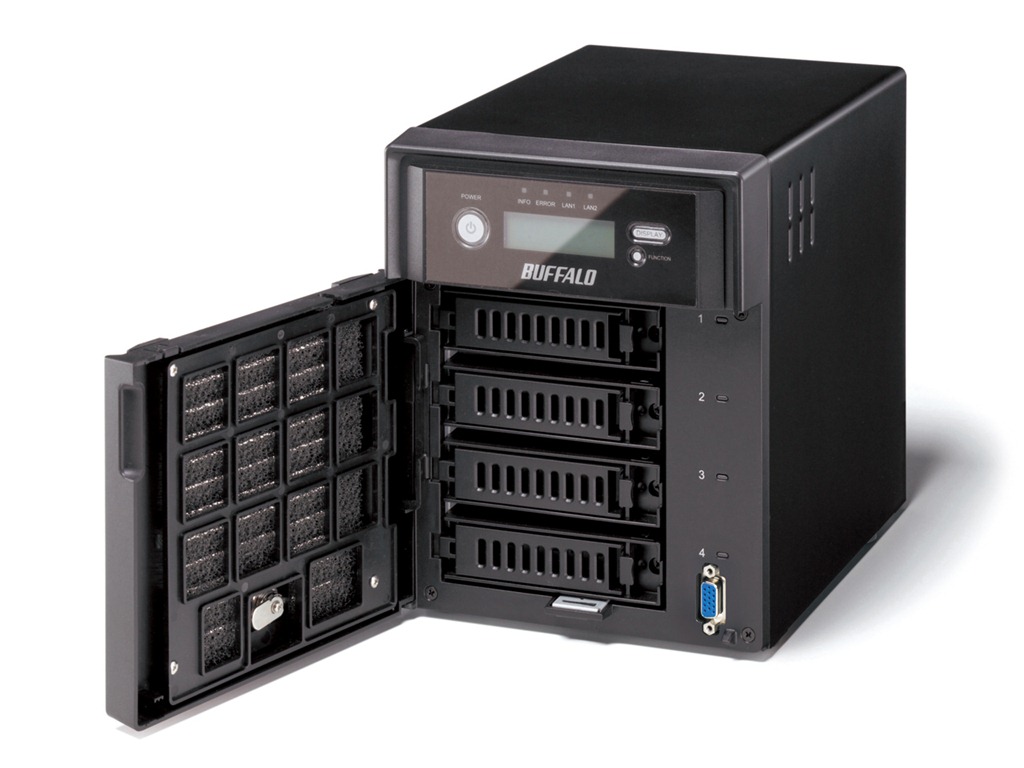
Setting up the unit was quite simple with easy to follow instructions. The LCD display tells you what’s going on along the way, so it’s simple for an SMB to setup. The only improvement they could make here is with the 8GB MicroSD & USB reader they supply – the instructions don’t tell you that you need to put these together to for the installation process, and I can see non experienced SMB clients, missing this point.
Once the base setup is complete, you have essentially, a Windows Storage Server 2008 R2 Workgroup edition system. You need to add it to the domain like you would a normal Windows Server and you do this by accessing the server via RDP.

Now the unit I have for testing has 4 x 1TB drives in it. Once I added it to the domain, I was able to see more about what is under the covers. I found they are using the Microsoft Windows OS based RAID for both the boot drive and the data drive.
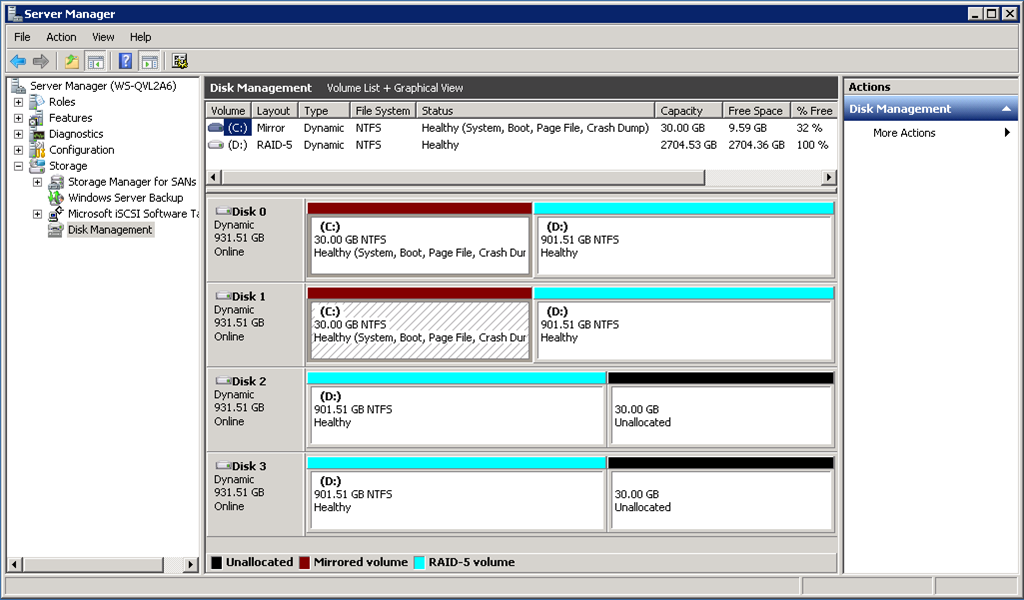
I guess I had assumed they would have a RAID controller of some kind in there, and was surprised that they didn’t.
I setup some shares on the unit and then went about testing it’s performance as a file server. While I didn’t record any performance figures, I found it to be quite responsive to everything I threw at it. I decided to use DFS-R to add this server to my production network and copied over around 2TB of data to it. Again it performed flawlessly.
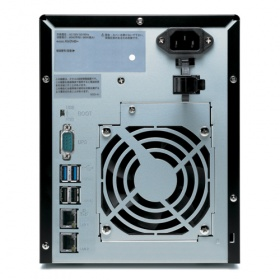
From an external perspective, there’s a few things of note on this system. Firstly, it has two NIC connections, these are not automatically bonded together so you can configure it however you like – even on two separate LANs if you chose. Nothing to configure – nice  Then you have two USB 2.0 ports AND two USB 3.0 ports on the back that you can use for printers, backup devices or additional hard drives. There’s also a serial connection to allow you to connect this to a UPS. Check out the pic below for a better idea of what is here.
Given that this NAS has Windows Storage Server 2008 R2 Workgroup edition, it has a few tricks up it’s sleeve that the WD unit does not have. For one, it can be used to host iSCSI targets, and that means I can use it with my Hyper-V environment and in other environments that I use iSCSI devices. This is where the Buffalo unit comes above some of the other entry level NAS devices aimed at SMB. It’s ability to be used as an iSCSI target gives it wider appeal for the larger SMB client.
Let’s talk for a minute about Windows Storage Server 2008 R2 Workgroup. It’s got limits, like most MS products, and it’s important to understand what those limits are.
Windows Storage Server 2008 R2 Workgroup edition has the following constraints placed on it by Microsoft.
- 25 remote connections (this roughly translates to 25 users)
- Up to 6 disks in the server (there’s 4 in this Buffalo NAS)
- No Single Instance Storage (this is a feature of Windows Storage Server 2008R2 Standard and Enterprise Editions)
- No DNS or RODC roles permitted
- No BranchCache.
Ok – now we’ve got that out of the way, we can see that this unit is really designed for the SMB space with 25 users or less. It can be used as an iSCSI target however which makes for good, cheap, reliable storage if you have a need for that. It would be ideal too in small branch office environments provided you are under that number of users.
Overall, this is a great little unit. I’m a little disappointed in the software only based RAID and the front panel LCD screen. It does however win points for having the ability to be an iSCSI target which gives added flexibility depending on the scenario you use it in. Pricing for this unit is higher than units including Windows Storage Server 2008 R2 Essentials, so I’d recommend looking at your business needs before deciding on what style of device you really need.
Hi there I like your post. It’s So much appreciated!
bookmarked!!, I reallу like your web site!
of no other man who brought so much benefit peoples like it.? After it was revealed in the Holy Quran.? It agreed superiority previous prophets (peace be upon them), and it is their seal.? He is the Messenger of not only humanity, but also to the jinn, angels, and even to the whole of creation.? His Shari’ah prescribed for all mankind. It cancels all previous Shariah and will continue until the Day of Judgment.? for the community of his followers provided the entire planet as a place of worship
Does your blog have a contact page? I’m having problems locating it but, I’d like to send you an e-mail. I’ve got some ideas for your blog you might be interested in hearing. Either way, great site and I look forward to seeing it expand over time.
canada goose jackets review
Do you mind if I quote a couple of your posts as long as I provide credit and sources back to your webpage? My blog site is in the very same area of interest as yours and my visitors would certainly benefit from a lot of the information you provide here. Please let me know if this ok with you. Thanks a lot!
that is definitely parka canada goose