Ok so now I ve finished testing it, there is one downside that I ve found that might make it a little more difficult for me as an IT Pro. During testing I ve found a few times that the Windows Live Family Safety Filter will prevent me from doing some basic testing (Pings etc) unless it is signed in. Now given I am administrator on my laptop it s not an issue for me to circumvent this when I need to. however now that I ve done my testing I decided that I want to remove the Windows Live Family Safety Filter. The only problem was that I could not find it in my programs list. After much digging I found it buried under the Windows Live Essentials option.
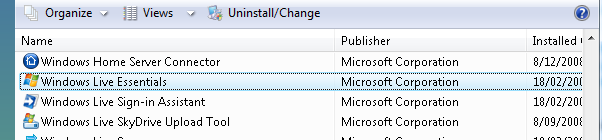
To remove Windows Live Family Safety Filter on Windows Vista, go to Control Panel > Programs and Features > Windows Live Essentials, and right click on it to select Uninstall/Change
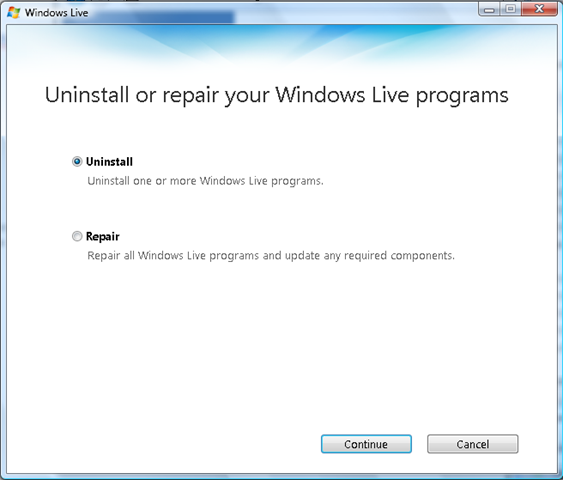
The select Uninstall from the Windows Live screen.
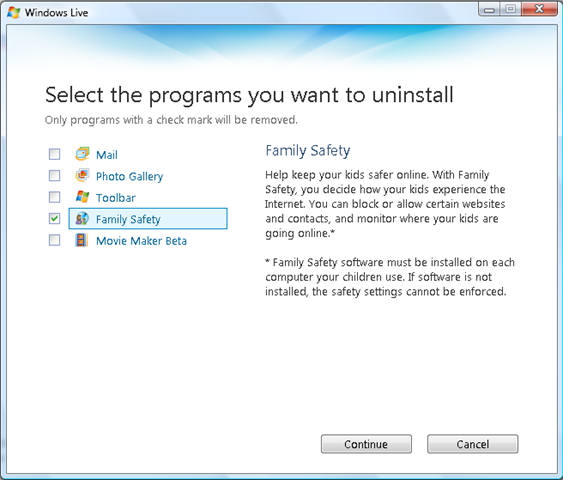
Select Family Safety to remove it.
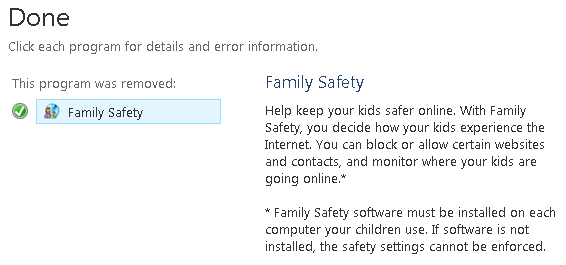
Once it s all done you get the following dialog box. As a precaution, I decided to reboot my computer even though it did not ask for it.
Seriously. I was having the same trouble. Very much obliged.
it was a program nazi to get rid of.. thanks alot.
Dear Sir,
If it is for some consolation to you, your huge waste of time was a blessing for me. Basically, I had the same problem which I could not solve. It is very frustrating when the solution given by the author (Microsoft) does not match what one have on his/her computer (http://help.live.com/help.aspx?project=oc_family_safety&market=en-us&querytype=topic&query=pc_proc_uninstall.htm). Instead, your instructions worked exactly as you described, saving me a lot of time. I really cannot understand why Microsoft decided to make this application (although useful when kids have unattended access to a computer) almost like a virus, not documenting even how to get rid of it, when it is not necessary.
Chapeau!
Hi guys,
i want to hear from you, that how can i uninstall/remove RWLFSF from Windows XP.
I tried it didnt work, LIKE I WENT TO CONTROL PANEL+WINDOWS LIVE ESSENTIALS+UNINSTALL+CHECK MARKED THE RWLFSF. Not worked ANY IDEA?
Thansk
Thank u very much man, This family safety program is a big headache.
You saved me a lot of headache! Thank You!
Using the control panel I found Windows Live Essentials but though I left or right click to uninstall, I still return to “Windows Live Essentials”. I cannot pull up the screen “Uninstall or Repair Your Windows Live programs”.
I am the administrator for my computer so I don’t know why I can’t get rid of this pesky family safety thing. (Only my 75 year old husband and I use this computer.)
I’m having the same problem. I right clicked Windows Live Essentials to uninstall, but nothing happens. The “Uninstall or Repair Your Windows Live Programs” doesn’t come out. This Family Safety is driving me crazy. Please help!
i don’t have windows essentials
but i can’t turn off my google search filter
plz help
HELP !!! I’m having the same problem on my Windows Vista except I’ve tried all the prescribed solutions and none of them worked. I could not even remove Windows Live Essential !!!
HELP !!! I’m having the same problem on my Windows Vista except I’ve tried all the prescribed solutions and none of them worked. I could not even remove Windows Live Essential !!!
this program is really killing me and i tried many ways to uninstall it but FAILED.. finally i get rid of it! THANKS! =)
YOU ARE A GENUIS!!!
I also straggled and wasted many hours to get rid of it. This is really strange that creator of program don’t provide relevant information to turn it off or uninstall it as user wants it. These kind of problems make people paranoid towards any programs, updates, renewals etc. This is much like a trap as you should seek help elsewhere.
What would myself and others do without your ADVISE lol….That family safety was and NO DOUGHT will allways be an annouance to many…If it was not for me finding this page, My computer would of been on my garden lawn. But again thank you…and THANK YOU FOR SAVING MY COMPUTER LOL
thank you so much. you saved me alot of time searching for a solution myself.
thank you soooooo much, brill!
Finally it s done
Thank you very much!
remove windows live family safety from desk top now
I really need help into this problem as well. I try to uninstall this painful software. But I am not getting any response after i click “Uninstall/Change” . Basically, i couldn’t get to the second screen shot you have.
Please help
Stupid program was driving me nuts. As others have said, Microsofts own instructions on uninstalling didn’t work.
Thanks so much for posting this, I’d never have found it in Windows Essentials myself.
Thanks, man. this also works for XP if you go to MY Computer>Add or remove programs> Windows Live Essentials
or:
Start>Control Panel> Add or remove programs> Windows live essentials
That thing popping up everytime i wanted to get onlne was getting SOOOOOOOOOOOO ANNOYING! i was ready to uninstall everything just to get rid of it. Windows live is cool with the excepton of famiky safety which i don’t have anymore 😀
Thanks alot , thats stupid family safety filter is sooo annoying!!
Thankyou SO MUCH!!! The family safety filter was a royal pain in the scrot from the beginning (not to mention the fact it came as an unwanted extra when i installed the new internet explorer), and then today when i tried to log on it started telling me some error code had occurred, and thus, i could no longer use the internet on my own computer… so i tried going through the help etc etc only to read that “there is no support offered for this service.” Woot. But anyways long story short followed your instructions too easy. Thanks again!
I was having a major issue with this, not being able to do anything on the net, until my good wife got this info, and we were able to get rid of it in 2 mins…..thank you for sharing…..not many people around like you….bless you…
how do i reinstall it?
Your a champ, Thanx for your great advise, That program was like a pimple on the ass of my pc! lol . Again ur a champ and thanx! 🙂
OMG i was freakin out!!! I tried to uninstall it several times but i couldn’t find it…that program is such a pain in the a..
THANKS ALOT!
Thank you sir, really thank you 🙂
Thanks so much! That thing has been driving me crazy for months, we don’t even have any kids that are old enough to use the internet and I have no idea hor the damn thing even ended up on the PC in the first place. One things for sure, there are no automatic updates set for our PC now!! Thanks again and bless you! 🙂
It is sooooo frustated to have that program in the computer
It is amazing how they can take over your computer.
Thanks again : I
My computer it was not working at all and I we having the same problems thank again
What template is this? I would like to use it on my site, did you make it?
This is a custom template that I had designed by a graphic designer and then coded into WordPress by a wordpress guru.. Sorry it’s copyright to me – you can’t use it 🙂 I’m happy to refer you to the people who helped design and code it though it you like.