Tuesday, December 6th, 2011
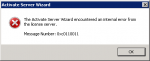
I was activating a TS Licensing Server today on SBS 2008 and had a problem activating it as you can see from the screen shot below.
Additionally, in the Windows System Event log, I had the following error.
Log Name: System
Source: Microsoft-Windows-TerminalServices-Licensing
Date: 6/12/2011 1:38:02 PM
Event ID: 38
Task Category: None
Level: Error
Keywords: Classic
User: N/A
Computer: server.domain.local
Description:
The Terminal Services license server cannot issue a Terminal Services client access license (TS CAL) to the client because of following error: Can’t add certificate to store, error c0010020.
It didn’t take long to track down this on the Microsoft support site to a known issue with a known fix. This MS KB Article here explains it all.
Downloaded and applied the hotfix and after a reboot, the problem is gone!
Tags: Licensing, Remote Desktop, Terminal Server
Posted in Blog | No Comments »
Saturday, September 3rd, 2011
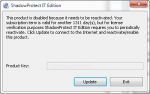
ShadowProtect IT Edition comes on a USB key now for some time. As part of the way to control licensing, StorageCraft require you to reactivate it every 90 days. That way if you lose your key, they can invalidate your license and give you a new one knowing that whoever finds your key can’t use it for more than 90 days.
Here’s how to reactivate your ShadowProtect IT Edition License server
Tags: Licensing, ShadowProtect, StorageCraft
Posted in FAQs | No Comments »
Tuesday, June 21st, 2011
Microsoft have produced a number of learning bite webcasts – this one is focused on the upgrade and downgrade scenarios around SBS 2011.
They also go into depth about the Premium add-on so that it’s easier to understand how to get to SBS 2011 from the various previous versions of SBS.
Tags: Learning Bites, Licensing, Microsoft, SBS 2011, SBS 2011 Essentials, SBS 2011 Premium, SBS 2011 Standard
Posted in Blog | No Comments »
Monday, June 20th, 2011
Microsoft have produced a number of learning bite webcasts – this one is focused on the Virtualisation Scenarios that can be built around SBS 2011. They make it simple to understand the potential that exists here and how you can correctly license it for SBS 2011 Standard, SBS 2011 Essentials and SBS 2011 Premium. Specifically they clarify that you cannot use SBS 2011 Essentials or SBS 2011 Standard as a Hyper-V host machine.
Tags: Learning Bites, Licensing, Microsoft, SBS 2011, SBS 2011 Essentials, SBS 2011 Premium, SBS 2011 Standard
Posted in Blog | No Comments »
Saturday, June 18th, 2011
Microsoft have produced a number of learning bite webcasts – this one is focused on the SBS CALS and Access Rights to the SBS network.
In this video, they talk about Remote Desktop Services and how it can be correctly licensed as well.
Tags: Learning Bites, Licensing, Microsoft, SBS 2011, SBS 2011 Essentials, SBS 2011 Premium, SBS 2011 Standard
Posted in Blog | No Comments »
Friday, June 17th, 2011
Microsoft have produced a number of learning bite webcasts – this one is focused on the licensing of SBS 2011 specifically the way you assign and use the licenses. Licensing for SBS is always something misunderstood and this learning bite does a good job of helping people understand it. They also talk about SBS 2011 Premium Add on which includes the licensing for the additional Windows Server and the SQL Server.
Tags: Learning Bites, Licensing, Microsoft, SBS 2011, SBS 2011 Essentials, SBS 2011 Standard
Posted in Blog | No Comments »
Friday, January 14th, 2011
I was helping a client setup some Windows XP machines (yes I know…. I know… old stuff) and we entered in one machines key against another machine by mistake. Now I’m a stickler for detail and really wanted things to line up right. There’s a Microsoft KB that tells you how to do it, but it involves regedits and scripts – surely there is a better way. I did a quick search on the net and found Magical Jelly Bean Keyfinder.
This free little utility will display your product key for you AND allow you to change it – a great tool that can get you out of a spot – as it did with me. Note there are some limitations – the free version won’t be able to show you Windows 7 or Office 2010 product keys.
Tags: Licensing, Windows XP
Posted in FAQs | No Comments »
Sunday, September 6th, 2009
Windows Foundation Server 2008 comes preinstalled with 15 Client Access Licenses. These licenses allow up to 15 users to access the server as a file and print server, or a remote access server. You cannot purchase any additional Client Access Licenses for Windows Foundation Server 2008 as it is limited to 15 users in total.
Tags: Licensing, Windows Foundation Server 2008
Posted in FAQs | 2 Comments »
Saturday, September 5th, 2009
Windows Foundation Server 2008 does not come with any inbuilt Terminal Server users. You may purchase Terminal Services Client Access Licenses (TS CALS) for up to 15 users to access your Windows Foundation Server as a Terminal Server. Attempting to install more than 15 TS CALs on your Windows Foundation Server is a violation of the licensing agreement.
Tags: Licensing, Terminal Server, Windows Foundation Server 2008
Posted in FAQs | No Comments »
Saturday, September 5th, 2009
Windows Foundation Server 2008 comes preinstalled with 15 Client Access Licenses. These licenses allow up to 15 users to access the server as a file and print server, or a remote access server. You cannot purchase any additional Client Access Licenses for Windows Foundation Server 2008 as it is limited to 15 users in total.
Tags: Licensing, Windows Foundation Server 2008
Posted in FAQs | No Comments »