Posts Tagged ‘Mobility’

Surface Pro to be available in Australia from May 30

Thursday, May 16th, 2013

I’ve had a Surface RT for 6 months or so now, and it’s pretty cool.  My one big moan about it is that it cant run the full Office suite including Outlook which I need if I am to replace my laptop with some other device.  Well news today is that Microsoft will release the SurfacePro devices here in Australia from May 30th.  At last!!!  Now I just need to figure out if I can justify the $1099 RRP for the 128GB model, and then fork out the extra $149.99 RRP for the Type Cover… decision, decisions, decisions…

Oh – I might have a SurfaceRT for sale soon too if anyone is interested Smile

Tags: ,
Posted in Blog | No Comments »

Toshiba R600 vs Porsche 911 Carrera… Toshiba lost.
Wednesday, July 20th, 2011

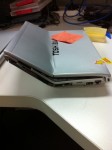
No – this is not a test to see how fast a Toshiba can reboot vs a Porsche 911, but a story from Jeff Wilson from VelocIT Business Systems and a member of the SMB IT Professionals organisation in Australia.  Jeff tells the story of an urgent call he had from a customer over a weekend where the customer needed him to look at something urgently – ie before Monday.  Being a customer focused professional, of course Jeff went to help out.  When he got there he found that the client has “accidentally” run his Porsche 911 over the laptop… see the pictures below!

photo 1

The screen still opened up

photo 3

And of course – compare the good with the bad.

photo 2

What is interesting from this is that the hard drive on these is stored under the keyboard palm rest area and it appears that this was not harmed – therefore the users data was still safe.  The laptop though was of course totally dead.  Jeff moved the hard drive over to the spare that the customer had and got them running quickly.

Now – aside from being some funny pictures of a laptop accident – it brings a few other thoughts to mind.

What are you doing for backups of your users mobile devices?  Are you backing up the entire laptop and if so, how often and using what software?

Personally I’m using Trend Micro SafeSync on my laptop to sync all the user changed data – word documents, Excel, PowerPoint and the like up to the cloud and then from the cloud, down to my desktop PC in the office.  This ensures that my user data is safe and sound.

In terms of the laptops operating system and applications, I’m using ShadowProtect to backup to a USB hard drive while I travel, or to my NAS in the office.  I’m also using the Client PC Backup technology from Windows Storage Server 2008 R2 Essentials to do a backup of the laptops while in the office as a 2nd approach.

What do you do?

Tags: , , , , , , ,
Posted in Blog | No Comments »

Trend Micro SafeSync – an alternate to LiveSync?

Thursday, May 12th, 2011

I’ve been using Windows Live Sync / Live Mesh for some time now and it’s done a pretty good job of what I need.  However recently I added an iPad to my stable of computers and suddenly the files I needed access to on LiveSync are not easy to get to anymore.  I’ve been searching for an alternative and for a while I played with DropBox.  However the security concerns around DropBox made me reconsider them as an option for my needs.  This is another worthy read on DropBox.

Today I’ve started trials using Trend Micro SafeSync.  I’m using a free trial account that I got from Trend Micro for their personal edition which has a limit of 5GB of cloud storage.  You can optionally purchase increased limits of 20GB/50GB or 100GB.  Personally – the data I need to protect and have access to like this is likely to be in the region of 5-10GB or so. 

Installing it was dead simple and after installation, I have a new drive letter (which I reassigned to W: )

image

All I need to do is to save files into this location and they will automatically be sync’d up to the cloud and also down to any other computers I have SafeSync installed on. For my testing I plan to use a variety of word, excel and PDF documents and use this location as my primary storage for them for the trial.

A big advantage of SafeSync over LiveSync/LiveMesh is that I can access the files stored on it via my iPad.  I note that they also support Android as well which is a great sign for open standards.

image

So I’m off an running now – I’ll report back in a month or so as to how the trial is going.  If I like this, I’ll move over everything from my LiveSync over to SafeSync.

Note that the version I’m using now is a personal version.  There is a Business version coming soon that will allow for more features such as the ability to more finely control access permissions to files stored on SafeSync.

If you want to give it a try then go ahead  click here to get a free trial (note clicking on that link will give me 1 more month on the free trial)

Tags: , ,
Posted in Blog | 7 Comments »

Tega v2 vs iPad – Frys Sunnydale, CA

Monday, October 18th, 2010

The release of the Tega v2 having occurred just last week, has meant that a couple of the accessory items are not quite ready… One of those was the leather cases that I wanted to protect my Tega v2 from the bumps n bruises that would occur having it with me 24 x7.  So today a trip to Frys was in order.  For those that don’t know, Frys is a major retailer here in the USA of all things geek… Imagine if you will (for the aussies) a Bunnings Hardware House that was just full of geek stuff… yeah – now you’re starting to get the idea! 

So off we went to Frys to find a case.  It also gave me the first real chance to compare the iPad with the Tega v2.  Below you can see a photo of me with both devices in front of the iPad stand.  We didn’t want to attract too much attention from the Fry’s staff so we only hung around long enough to take the photo before moving on to other places in the store.  While we were there though we had half a dozen people asking about “What is that device…”  When I told them it was a Windows version of the iPad they were all over us wanting more… Hugo – if I had cards, I would have given them out Smile  This to me confirms though that people really do want a Windows based iPad device. 

69488_459505020072_611190072_5555831_3027417_n

Oh – and the case I picked up was a Belkin case designed for 10” netbooks.  Fits my Tega v2 like a glove.  Maybe Hugo can do a deal with Belkin to get some printed with Tega v2 on the outside.. hehehe

This blog post is written on my Tega v2 with nothing more than my fingers (look ma… no keyboard)

Updated 19/10/2010 – The case was a Belkin Netbook Portfolio – 2410YW is the model number I think.

Tags: ,
Posted in Blog | 4 Comments »

Tega v2- 1st impressions

Saturday, October 16th, 2010

I’ve now had my Tega v2 for 24 hours. 12 of those hours were spent in a plane flying to the USA. This blog post is being typed using it at 39,000 feet according to the planes systems.  Overall I am impressed with how it performs and how Windows 7 works well with the touch screen.  The biggest challenge I am having now is getting used to typing without tactile feedback.  Will post more soon.

Tags:
Posted in Blog | No Comments »

Is this an iPad Killer?

Saturday, October 2nd, 2010

A good friend of mine – Hugo Ortega from Tegatech announced on Facebook today about his new Tega V2 that’s going to be released on October 12th.  What’s more is that he’s been lucky to get this product featured on national TV around Australia on October 4th.

I’ve been toying with the idea of getting an iPad – a few fellow geeks have taken the plunge, but I can’t quite bring myself to going over to the dark side given my deep love of everything Microsoft (ok maybe not everything, I mean Vista was a bit of a failure after all)…  So I decided after reviewing the specs for the Tega v2 and talking to Hugo himself about my requirements, that I will indeed take the plunge.  I’ll buy one of these and take it with me to the USA in a few weeks.  If this device can do everything I want to then I won’t really need my Toshiba Portege R600 for most of my meetings.  I’m sending in my order to Hugo this weekend and have fingers crossed he can get me one before I leave to the US.  I’ll document my experience with the device and post a review here once I’m done.

Tags:
Posted in Blog | 3 Comments »

Telstra BigPond Broadband Mobile and Telstra Mobile Internet are not the same

Friday, June 4th, 2010

I’ve spent a bit of time over the last few days finding out how insane Telstra are.  Ok – I’m sure many of you will tell me that I should have known that already :-)

Basically in December last year I went into the Telstra store and discussed my requirements with the shop assistant.  I wanted a 21MB broadband connection that I could use via USB on my current laptop, but that my new laptop which was on order (Toshiba Portege R600) had an embedded NextG modem and I wanted to be able to move the SIM from one device to the other at will.  The shop assistant sold me a Telstra BigPond Broadband Mobile device.

Ok – so I take it hope, and during the sign up process it failed to activate.  After talking to the support team, it turns out that this device has already been activated. That seemed a little strange when you think that the box was totally sealed when I got it – never mind – back to the store and they swapped it.  The second device activated and worked just fine and I was happy.

Now – some months later, my new laptop arrived – yippeee :-)   I took the SIM Card out of the BigPond device and installed it into my laptop.  I then spent time trying to make this work.  I tried APNs including telstra.internet, telstra.bigpond, telstra.pcpack and telstra.datapack.  I also tried using my BigPond username and password and ultimately failed.  I called BigPond support for assistance and after over an hour on the phone I was told “Oh you can’t do that…”.  I was told that the BigPond Broadband Mobile devices are sold as a package, i.e. the SIM and the device are one and can not be separated at all.  Ok – thats not what I wanted.  The BigPond phone rep told me I should take it back to the store and discuss it with them.

I took the BigPond Broadband Mobile device back to the store and spoke with the manager.  I told him what I wanted and even pointed to the Toshiba Portege R600 they had on display to show him that is what I had. The manager took it all in his stride and set about fixing things.  After a further 2 hours at the store, they finally had it sorted.  The cancelled my BigPond Broadband Mobile account and issued a new Telstra Mobile Internet account complete with a BLUE USB modem that looked identical to the white one except for colour.  It was explained to me that the Telstra Mobile Internet SIM was movable from device to device without any issues, but the BigPond one was not.

End result – I’m happy.  But I thought I’d blog this to save others out there some time and pain.

Tags: , ,
Posted in Blog | 9 Comments »

How to make the TyTN II work with Windows 7

Tuesday, April 20th, 2010

I tried to get my HTC TyTN II to work with my new laptop running Windows 7 – it would not work. When I connected it to the laptop, it came up in device manager and device stage as a Generic RNDIS device.  I found that the only thing that worked was to install the Windows Mobile Device Centre – you can download it here

clip_image001

Still not quite sure why it didn’t work as designed, but hey – it’s working now.

Tags: , ,
Posted in FAQs | 1 Comment »

Windows Phone 7 announced

Tuesday, February 16th, 2010

Microsoft today have release some more official information about the next generation of Windows Mobile devices in via way of there new website http://www.windowsphone7series.com/

The interface looks like a mix between and iPhone and a Zune which is rather interesting, and it also seems to make great use of 3D graphics, which I guess will mean that power demands on the devices will be pretty harsh. There’s also direct links into Facebook and Windows live along with connecting all that information directly into your contacts pane.

My initial impressions are that I like this.  I think this could possibly take them a few steps ahead of Apple and their iPhones if only they can get it out there pretty darned quickly :-)

Tags: ,
Posted in Blog | No Comments »

How to erase a HP iPAQ rw6828

Monday, December 7th, 2009

I’ve had one of these for years now – nice little phone indeed, solid and reliable.  I use it now when I travel to the US and put my US prepaid SIM into it so that my US buddies and I can talk without it costing loads of money.  I lent this phone to Dean Calvert back in July when his phone failed him at the Microsoft Worldwide Partner Conference and just now went to use it for myself.  Without thinking I connected it to my laptop and told it to sync with my local outlook profile.  It proceeded to merge all of Deans Contacts, Calendar items etc into mine… so now I have Deans entire contact list. I wonder how much he wants for it back.. :-)

Anyway – I wanted to erase this device so I can start again, a bit of googling and I found the solution. Unfortunately you need three hands to do it, but here it is for future reference.

To erase the HP iPaq rw6828 you need to do the following.

  1. Hold down the Call, Hang up and power buttons
  2. Use the Stylus to press the reset button

The system will erase everything in the internal RAM and you are good to go again.

Tags:
Posted in Blog | No Comments »