Posts Tagged ‘NAS’

Performance Testing non Windows based NAS devices

Wednesday, August 15th, 2012

I decided to do some very basic performance testing of non Windows based NAS devices that I’ve got here at in my lab / production network.  The aim of this is not to come up with a winner or loser, but to understand what levels of performance I might expect from these NAS devices. I’ll break this testing up into two categories, and tonight’s blog post will feature the non Windows based NAS devices I have.  A future blog post will focus on Windows based NAS devices as well as Windows based Servers.

Currently I’ve got the following devices in my environment.

Now I’m going to start of by saying that these tests are NOT equal.  Aside from the source machine being my desktop PC, and using ShadowProtect to backup the C: drive, there are many other variations to the configuration.  The intention on this is NOT to give categorical winner/loser, but to get a feel for performance.  I configured an SMB share on each of the devices and then used ShadowProtect to backup my desktop to it.  My desktop has around 121GB data on it’s C: drive, so it’s a good candidate for an average desktop.

Ok – so the results of the test are as follows

Device

Time

Speed

WD MyBookLive

45m 1s

45.68MB/s

QNAP TS410

55m 19s

37.36MB/s

Buffalo Link Station

48m 48s

45.26MB/s


What does this tell me?  Well in all likelihood if you want the fastest backup, then a single drive is probably the way to go.  Any form of RAID seems to lessen the performance a little, but interestingly the Buffalo did well with a 3 drive RAID5 array – that surprised me.

So – there you have it – some idea of how fast you can expect from some of these devices when used as a ShadowProtect target.  There’s quite a few other tests that I plan to do with this such as using them as FTP targets for ImageManager, but that will come later.

If any vendor out there wants to loan me a device for testing, I’m more than happy to put it through it’s paces Smile

Tags: , , , , , , ,
Posted in Blog | 1 Comment »

Buffalo TeraStation Pro WSS Quad

Tuesday, June 26th, 2012

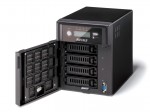
Recently Buffalo approached me with an offer to try out their products to see if they had a fit for our clients in the SMB market. Given I’m playing with a few NAS devices at the moment, it was a great chance to take a look at something I’d not seriously done before. The local Aussie representative from Buffalo, Boris, kindly offered a Buffalo TeraStation Pro WSS Quad 4TB unit for an evaluation so I could get a good feel of how it performed.

The unit arrived well packaged and upon opening, I found a CD and small USB key which were both needed to get the server up and running. The unit is physically quite small with a single power supply. The power supply does have a cable lock that will prevent the cable being accidentally removed which I thought was a good touch. There’s a front Panel LCD which shows a stack of useful information. The downside though and something I didn’t like about it was that the LCD can only be read up close. The light blue on blue background made it impossible to see across the room which was a detraction from the overall tidy looking front panel.

ws-qvl_r5_c2

Setting up the unit was quite simple with easy to follow instructions. The LCD display tells you what’s going on along the way, so it’s simple for an SMB to setup. The only improvement they could make here is with the 8GB MicroSD & USB reader they supply – the instructions don’t tell you that you need to put these together to for the installation process, and I can see non experienced SMB clients, missing this point.

Once the base setup is complete, you have essentially, a Windows Storage Server 2008 R2 Workgroup edition system. You need to add it to the domain like you would a normal Windows Server and you do this by accessing the server via RDP.

image

Now the unit I have for testing has 4 x 1TB drives in it. Once I added it to the domain, I was able to see more about what is under the covers. I found they are using the Microsoft Windows OS based RAID for both the boot drive and the data drive.

image

I guess I had assumed they would have a RAID controller of some kind in there, and was surprised that they didn’t.

I setup some shares on the unit and then went about testing it’s performance as a file server. While I didn’t record any performance figures, I found it to be quite responsive to everything I threw at it. I decided to use DFS-R to add this server to my production network and copied over around 2TB of data to it. Again it performed flawlessly.

From an external perspective, there’s a few things of note on this system. Firstly, it has two NIC connections, these are not automatically bonded together so you can configure it however you like – even on two separate LANs if you chose. Nothing to configure – nice Smile Then you have two USB 2.0 ports AND two USB 3.0 ports on the back that you can use for printers, backup devices or additional hard drives. There’s also a serial connection to allow you to connect this to a UPS. Check out the pic below for a better idea of what is here.

BuffaloRear

Given that this NAS has Windows Storage Server 2008 R2 Workgroup edition, it has a few tricks up it’s sleeve that the WD unit does not have. For one, it can be used to host iSCSI targets, and that means I can use it with my Hyper-V environment and in other environments that I use iSCSI devices. This is where the Buffalo unit comes above some of the other entry level NAS devices aimed at SMB. It’s ability to be used as an iSCSI target gives it wider appeal for the larger SMB client.

Let’s talk for a minute about Windows Storage Server 2008 R2 Workgroup. It’s got limits, like most MS products, and it’s important to understand what those limits are.

Windows Storage Server 2008 R2 Workgroup edition has the following constraints placed on it by Microsoft.

Ok – now we’ve got that out of the way, we can see that this unit is really designed for the SMB space with 25 users or less. It can be used as an iSCSI target however which makes for good, cheap, reliable storage if you have a need for that. It would be ideal too in small branch office environments provided you are under that number of users.

Overall, this is a great little unit. I’m a little disappointed in the software only based RAID and the front panel LCD screen. It does however win points for having the ability to be an iSCSI target which gives added flexibility depending on the scenario you use it in. Pricing for this unit is higher than units including Windows Storage Server 2008 R2 Essentials, so I’d recommend looking at your business needs before deciding on what style of device you really need.

Tags: , , ,
Posted in Reviews | No Comments »

WD Sentinel DX 4000 – Initializing

Thursday, June 21st, 2012

Yesterday, my WD Sentinel DX 4000 appeared to have locked up – it had stopped responding to the front panel buttons. I wondered why it had done this and then I found I had inadvertently taken it off the UPS when I re-cabled some things the other day and I suspect we had a power fluctuation which caused it to glitch. Anyway – the only way to resolve this was to hard power it. Now this is something that you normally SHOULD NOT DO to any computer, least of all a server like this. But it was my only choice.

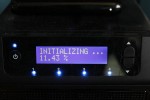
After the reboot, I found that the front panel had advised that it was Initializing…. now at first I panicked and thought that it was erasing and initialising everything on the server. I was however able to RDP to the server and verify that my data was there. I left it and after 8 hours, it was up to 5% done. I also noticed that anything I tried to do via RDP on the DX 4000 was very slow as well. I figured that the initialisation process was very disk intensive, so I left it at that. I’d heard of this before and wondered what it all meant. I sent an email off to some people I know at WD to get some answers. Given it was late at night, and me being impatient, I later decided to reboot the server and found that it seemed to be far more responsive, however the Initializing process continued at it’s normal rate. Given my data was not at risk, and that performance seemed to be fine, this didn’t bother me.

This morning, my status was as below on the front panel.

_MG_2013

You can see via the Dashboard, that it’s showing much the same thing – all disks are normal and my data is intact.

image

Ok – so the official explanation of what is going on here.

This is normal behaviour for the WD Sentinel DX 4000 under the following circumstances:

I know that WD are aware of the issue and they are looking into ways to better handle this in advance of any unclean shutdown. They have assured me that the chances of data loss are quite minimal provided I allow the initialization process to complete – which of course I am doing.

Oh – I forgot to mention – I’ve moved this back over to the UPS so that it won’t experience any unplanned failures again.

Tags: , ,
Posted in Blog | 3 Comments »

Where can I get support for my WD DX 4000 Sentinel?

Thursday, April 12th, 2012

There’s an online support forum available here which seems to have a reasonable bit of traffic.

Tags: , ,
Posted in FAQs | 1 Comment »

How can I reset my QNAP Admin password?

Tuesday, January 3rd, 2012

I’ve been playing with the QNAP TS410 recently – it’s part of my production and test LANs here at SBSFaq.  After having played with it a bit in my test LAN, I decided that I was ready for using it in production as well.  Only problem was I forgot my admin password Sad smile

Resetting it is easy.

  1. Locate the reset button on the rear of the TS-410.
  2. Press and hold it till you hear a beep. 
  3. After it beeps your admin password will be back to admin (all lower case) and your IP info will be back to DHCP assigned.

Once you’ve done this – you should be good to go… make sure you document it for next time though.

Tags: ,
Posted in FAQs | 1 Comment »

Client PC Backup in SBS 2011 (SBSv7) is now available.

Tuesday, November 9th, 2010

Today Microsoft announced what I think is some very cool reuse of their technology that will have massive benefits for SBS 2011 and even non SBS environments. 

Windows Storage Server 2008 R2 Essentials is a great new product from Microsoft that uses the combination of Windows Server 2008 R2 as a base and adds in the Client Backup technology from SBS 2011 Essentials.  This new hybird was codenamed Breckenridge and was one of the most closely guarded secrets in the new Small Business family.  I’ve had the chance to play with this now for many months and I love what I see.  Storage Server 2008 R2 Essentials (SS2008R2E) is a box that can be domain joined and will support backup for up to 25 client PCs.  You can use it as a NAS however for an unlimited number of users.  This box can be joined to both SBS and non SBS environments and gives us great potential to use it for things like remote branch environments where we need a small NAS for local file sharing AND it can backup the local client PCs as well.  What’s more is that you can add multiple of these units into a domain to cater for backup of hundreds of PCs (limited to 25 per box however).  It also has the very cool Remote Web App (formerly Remote Web Workplace) interface that SBS 2011 Essentials and the new version of Windows Home Server (codenamed Vail) has.

The SBS team have also announced the device here on their blog and have provided screenshots too.  Check it out.

Tags: , , , , , ,
Posted in Blog | 6 Comments »