Thursday, June 16th, 2011
Microsoft announced today the release candidate of the Windows Server Solutions Phone Connector pictured below. This cool Windows Phone 7 app will allow you to control a lot of facets of your SBS 2011 Essentials server right from your phone. How very cool is that.
This new app will work with Small Business Server 2011 Essentials, Windows Home Server 2011 Premium and Windows Storage Server 2008 R2 Essentials. For me – this might finally be a reason for me to get myself a Windows 7 phone… I’ve been holding off waiting for something worthwhile to come along and this might well be it.

You can sign up for the RC with Microsoft and read the official announcement is here
Tags: SBS, SBS 2011, SBS 2011 Essentials, Windows Home Server, Windows Home Server 2011, Windows Phone 7, Windows Storage Server 2008 R2 Essentials
Posted in Blog | 1 Comment »
Thursday, June 9th, 2011
In todays move to disk based backups, we often forget the old days of tape when you had monthly archives off to tape that some people kept for a VERY long time. Today, so many vendors and resellers focus exclusively on backing up JUST so that you can recover the business in a DR scenario. As such we focus more on the recovery process than the longer term archival process. Herein lies a problem. What happens if corruption of your data goes unnoticed for some time? What happens if you do not keep regular archive only backups?
Well in the last few weeks I’ve hit just that problem myself. Below you see a photo from a kitchen renovation I did for my parents back in January of 2002. I was digging for these to compare to now for my parents and discovered the corruption. Once I found this one, I then dug deeper into it and found to my increasing horror that every single image I’ve taken from 1997 through to August 2007 – thats 10 years of memories, was similarly corrupted.
You can bet that I was not happy. I was feeling so sick at the loss of all these memories, i cried because it was not Mum’s kitchen I was worried about, it was the family photos that are no longer stored as negatives or printed pictures in a photo album or in a box in the attic… it was those memories that I had lost.
Did I have backups – sure – I had backups of this server done on a regular basis to account for a failure of the hard drives and so on. Did I have archival backups over the last 10 years??? umm – NO!!! Over the last 10 years these photos have been stored on a number of different servers and more recently they were on my old Windows Home Server and I know that there had been at least one disk failure on that box, but Windows Home Server had said it had rebuilt the lost data. I checked some recent photos after that and they were fine.
So last night I was talking to a friend about the loss of these memories (thanks Meredith) and she just said… “surely you have older backups somewhere…”. That tripped a memory that maybe I had some old hard drives that I’d used to do the backup. I did some digging into a box of old hard drives and found one from 2009 that I had put aside because the data was too big to fit onto it. I then found all my photos were in fact intact on that backup.. you should have heard the screams of joy.
Recovery from that point was fast and now my data is once again intact. As you can see below the original image is once again complete as are the family memories that are so precious to me and my family.
I believe that the corruption was more likely a result of a Windows Home Server bug from the DriveExtender technology in the original version more so than a failed disk drive as from what I can see the problems occurred when I copied all these image over to a NEW Windows Home Server that I had built BEFORE I had it patched correctly to resolve that known issue. This also reinforces the point of checking and double checking that you have things setup correctly before putting critical information at risk (yes I know I should have my computer license stripped from me)
Ok – all of this has made me think even more seriously about archival backups and how you do them. I’m looking at options that will help me survive things as we move forward into the future. I’m considering both online and offline backups. What do you use and why?
Tags: Backup, Disaster Recovery, Personal, Recovery, Windows Home Server
Posted in Blog | 1 Comment »
Wednesday, December 1st, 2010
Last week I reported here, that Microsoft had decided in their infinite wisdom to remove the Drive Extender technology they were building from SBS 2011 Essentials and Windows Home Server “Vail” both due for release in 2011. Following this announcement there was a huge amount of outcry from the community but this outcry was actually not so much focused on the removal of the technology from the SBS 2011 Essentials product, but on it’s removal from the new Vail Home Server product. To me this was a killer feature of Vail / Home Server. Just look at the bug that was lodged in Connect that’s over 4000 individual REAL PEOPLE that believe this was a bad idea to remove it from Vail.
Terry Walsh – Home Server MVP from “We Got Served” decided to take matters into his own hands. He write to the big man himself (no – not Santa Claus)… Steve Ballmer to let him know of the massive outcry from the community and ask for something to be done. Well – Steve B himself responded… in his typical shorthand fashion of “I’ll look into it…” Now – for Terry this is the first time that he’s written to Steve B. Personally – I wrote to Steve B earlier this year when Microsoft decided to kill the Essential Business Server (EBS) product line. I also got a response from Steve indicating that he’d look into it. As you will know EBS is still dead. I did however get contact from some very high level people in the Microsoft Executive team so that they could understand my concerns. However I believe that the situation here is a little different. I believe and hope that Terry’s plea and the 4000+ others that have voted on the Connect bug actually will make a difference. I believe that Microsoft will listen to the community feedback and seriously hope that they will consider making the Drive Extender technology available in the Vail / Home Server product only. As an MVP, I HAVE TO believe that Microsoft listen to our feedback and that Drive Extender (unlike EBS) will rise from the dead. Time will tell. Steve Ballmer – it’s up to you. Terry Walsh… good on ya mate for giving it a crack and letting the big man know. If you disappear and we see black helicopters around, we’ll know where to look for you ![]()
Tags: Drive Extender, Future Products, SBS 2011, SBS 2011 Essentials, Vail, Windows Home Server
Posted in Blog | 5 Comments »
Wednesday, November 24th, 2010
Sadly, today Microsoft announced that they would be ceasing development of the Drive Extender feature that was to be part of SBS 2011 Essentials and the new Windows Home Server version. No – Microsoft are NOT cancelling SBS 2001 Essentials OR Windows Home Server, but they are removing what I consider to be a key feature to those products. They announced it today here on their blog.
Why would they do this? Honestly – only Microsoft know. What I know is that I’m disappointed that the feature is gone, particularly from the Home Server product as this was a very cool way to easily expand your drive storage pools without needing to have drives all of the same size. From what I saw, it worked pretty darn well in Windows Home Server v1 – sure there was a hiccup with storing certain types of data on it, but for music, videos and photos it seemed to work pretty well indeed.
What do we do now? Well – we do what we have always done. We use either Software RAID built into Windows Server that underlies all of this (yuck) or Hardware RAID to give us the protection we need for our drives.
I know that a few of my fellow MVPs were told of this recently and sworn to secrecy under our NDA, and we honestly were dumbstruck as to the fact it had been cancelled. I can only assume that the powers that be at Microsoft know what they are truly doing by removing this feature. On the flip side however, it means that any server backup or antivirus product that worked with Windows Server 2008 R2 will now most certainly work with SBS 2011 Essentials without modification! See – there is a silver lining there somewhere ![]()
Tags: Future Products, SBS 2011, SBS 2011 Essentials, SBS Aurora, Vail, Windows Home Server
Posted in Blog | 6 Comments »
Tuesday, June 8th, 2010
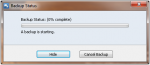
Recently my Win7 x64 desktop machine started to fail it’s backups to the Windows Home Server I have. I attempted to do manual backups but it just hung at 0% complete as per the screen shot below.
To diagnose the problem, I looked at the client side log files which are located at C:\Users\All Users\Microsoft\Windows Home Server\logs on the computer.
In particular I looked at the BackupEngine log file (it’s name is a fair bit longer and is based on the date/time that the last backup was done). You can see my log file below. It appears to be failing at the VSS Snapshot attempts.
Ok – Run a CMD prompt now and then the use the VSSADMIN LIST WRITERS command to show the current state of the VSS writers on this computer. It gives the output below. You can see that a couple of the writers are in the “State: [5] Waiting for completion”.
Ok – now into the event logs on the server and I can see that it looks like we have a few critical errors in the VSS including the one below.
We’re on the right track now. I ran a script to re-register the VSS writers and rebooted and as you can see all the VSS writers have returned to normal.
I then ran the VSSADMIN LIST PROVIDERS command to list the providers of VSS services on this machine. It showed TWO VSS Providers, one being the standard Microsoft Software Shadow Copy Provider v1.0 and the other belonging to a third party imaging product that I was beta testing but had since removed. Given I’d removed the imaging product, the provider should not have been there, so I traced back in the registry to find that it’s registry key still existed under HKLM\SYSTEM\CurrentControSet\CSS\Providers. I was able to delete the offending registry key for the VSS Provider, reboot and run backups. Backups have been running just fine now for the past month without issues.
Tags: Troubleshooting, Windows Home Server
Posted in FAQs | 6 Comments »
Tuesday, April 27th, 2010
I’m prevented from talking publicly about the next version of Microsoft Server products, but now that Microsoft have announced the public beta of Windows Home Server aka Vail, I can at least talk about it
I would HIGHLY recommend that ALL SMB IT Professionals look closely at the Vail beta. Why? Well think about the move to the cloud for many clients and about how Vail might well fit into the smaller client environments, allowing them central control over their files, backups of machines and so on. Vail is something Microsoft have been working on for some time and I can see how we might use this technology in our current client environments. Sure it does not have Active Directory, but honestly – when did you last use Group Policy to do anything meaningful in a 10 workstation network?
Get onto the beta TODAY here
Tags: Beta Product, Vail, Windows Home Server
Posted in Blog | 3 Comments »
Wednesday, December 9th, 2009
Today I solved the problem I’ve had with Live writer not being able to publish images to my WordPress blog. I’m here in Redmond with other MVPs from around the world and I was talking to Terry – the dude behind WeGotServed… not – that’s not the comedy of “Are You Being Served”, but a Windows Home Server MVP. Terry runs his site on WordPress also. Anyway long story short Terry had a similar issue and he found the solution here. There’s some changes in WordPress that require you to run a SQL command to extend the database. Did that and now woohoo, I can now blog from Wordpress WITH images without the pain. Thanks Terry.
Tags: Windows Home Server, WordPress
Posted in Blog | 1 Comment »
Wednesday, December 5th, 2007
Ok – this is one that all the Home Server Enthusiasts will want to watch and send to their friends http://www.stayathomeserver.com/
Watch for more updates to it – it’s kooky but cool!
Tags: Windows Home Server
Posted in Blog | No Comments »